


"Access denied" error on specific website
I am running Firefox version 153.0.1 on a 64bit install of Windows 11.
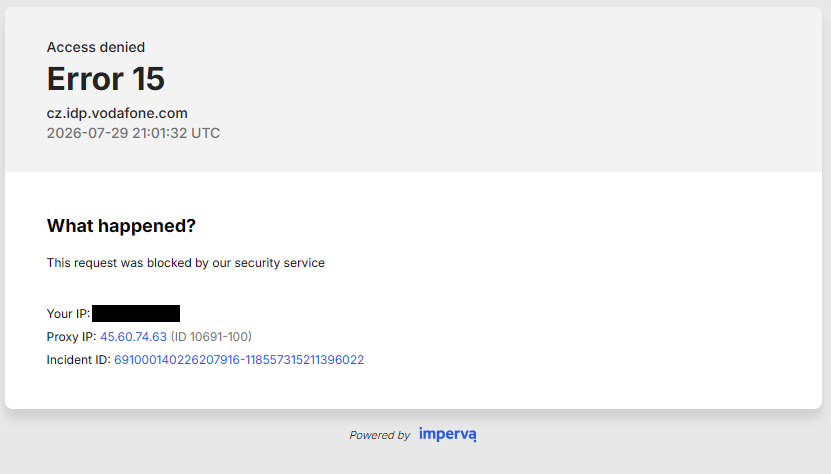
A few days ago I had to factory reset my computer, including a clean Windows install. Since then, when attempting to access https://vodafone.cz/muj/prihlaseni, I get an Imperva Error 15 "Access Denied" error screen - screenshot attached here. Clicking the Imperva logo on the bottom of the error message leads to https://www.imperva.com/why-am-i-seeing-this-page/?src=23.
I was able to access the site in the past, most recently on July 8, 2026 - this would have been Firefox version 152.0.5.
This error persists in troubleshooting mode but not in private/anonymous (with or without extensions enabled), nor does it appear in Microsoft Edge or Firefox on Adroid.
Clearing cookies and cache did not help - in fact the error first showed up on a clean install of Firefox, when there weren't any cookies or cache stored yet. I've tried different DNS over HTTPS settings and listing the site as an exception in settings, but none of this made a difference. Enabling Firefox's built in VPN also made no difference, regardless of the selected location.
I found a recent post (https://support.mozilla.org/en-US/questions/1588627) describing a similar issue on a different website and tried the suggestion listed there to try a fresh profile - this seemed to work, but within a couple of minutes of browsing the error message returned. I've even reinstalled Firefox entirely, but this too did not help for long.
Interestingly enough, the error message lists a proxy IP address (not blacked out on the screenshot) despite the fact that I am not using a proxy.
The website provider's tech support claims this is an issue on the user side, not theirs - they have not been able to replicate the issue.
Is there anything I'm missing that would explain why this is happening?
Thanks!
All Replies (2)
The "proxy IP" belongs to Imperva in fact. Perhaps they're not understanding their own traffic from their own edge and classify it as datacenter traffic? ;D (which… it is, right?;D)
One hint: if they're fingerprinting you, Private Mode now IIUC flips some ETP to more strict (some GPU manufacturer details etc.?) — maybe, if in non-private mode, you'd raise the ETP protection… maybe then after clearing the site's data you'd be able to pass as "Strict" perhaps?
Unfortunately I've had ETP set to "strict" the whole time and it doesn't seem to have made a difference - neither did disabling ETP for the site. Unsure what else could be done at my side to bypass this.
I've tried contacting Imperva through the form on their site (I'm not in a country where I could call their support number, and their support portal seems to only be accessible to their customers, which I am not) but have not received a response from them so far.