


Sign in issue with CanadianTire.Ca only on Firefox (works on Brave, Chrome and Edge)

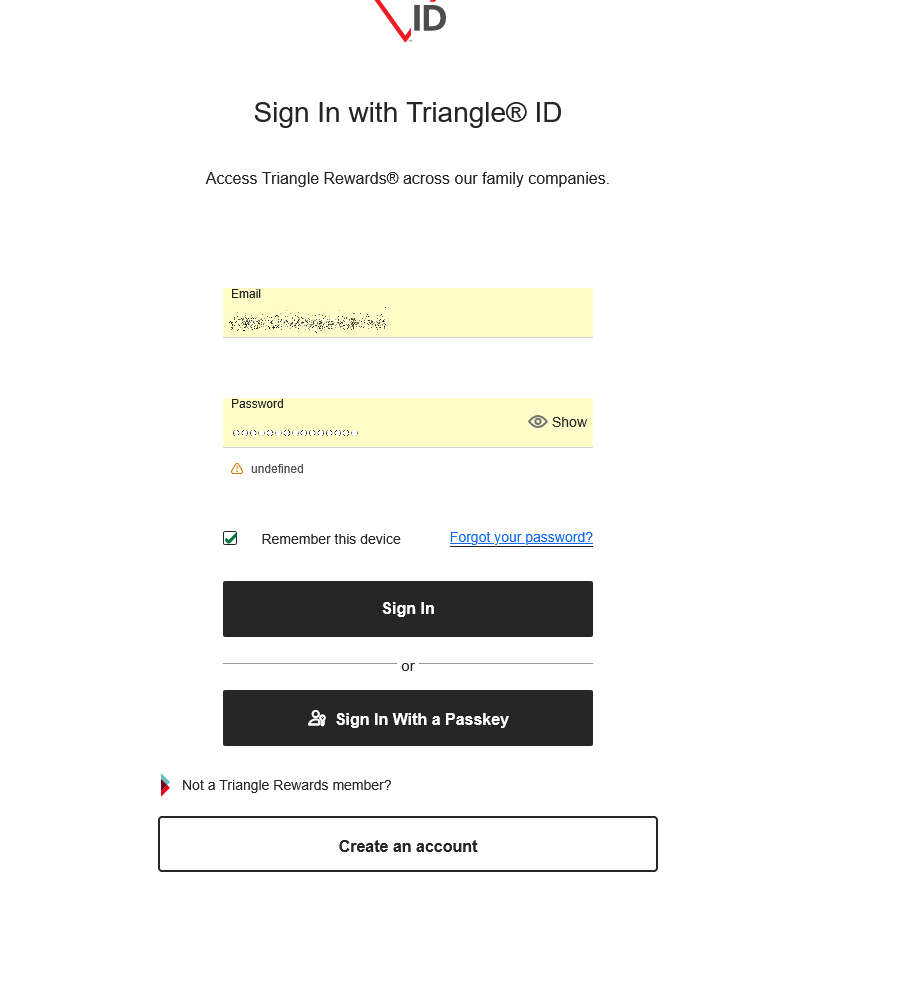
For quite some time now, I am unable to sign in to my account at CanadianTire.Ca I get an error. The signon process goes to CustomerAuth.Triangle.Ca for the email and password input. When I click "Sign In" the return message is a yellow triangle followed by the word "undefined" (see attached).
All other browsers I have (Brave, Chrome and Edge) can sign in without issue.
I noticed that other users have the exact same issue. I have tried all solutions I could find. The browser is up to date as of today (150.0.2 64 bit). I tried troubleshoot mode, clearing the cache, deleting cookies, history .... On the web site I turned off ETP for CanadianTire.Ca and CustomerAuth.Triangle.Com.
I have used Firefox since it was v0.93.
H E L P ! ! !
모든 댓글 (5)
Hi,
Could you please try creating a new Firefox profile and check if the issue persists there? If it does, please report it on WebCompat for our team to look into. We'd also appreciate posting a link to your report here.
I see fresh bug 2015409, but the issue there seems to be much narrower than what you describe.
PS You can edit your question by clicking Edit this question from the menu at the right.
Start Firefox in Troubleshoot Mode to check if one of the extensions ("3-bar" menu button or Tools -> Add-ons -> Extensions) or if hardware acceleration or if userChrome.css/userContent.css is causing the problem.
- switch to the Default System theme: "3-bar" menu button or Tools -> Add-ons -> Themes
- do NOT click "Refresh Firefox" in the Troubleshoot Mode start window
cor-el ... please read my initial post and you will see that I have tried this already.