


slow startup with an error message afterwards + "enter" does not work

My Firefox doesn't open instantly but after a while it shows a message that one of the scripts have crashed with the options to either continue or stop script. After the main window is opened there's a message that Firefox cannot open the Toolbar. "Enter" also does not work in the address bar after this issue.
Screenshot of the message: http://i1176.photobucket.com/albums/x322/mveits/Firefox/Capture.jpg
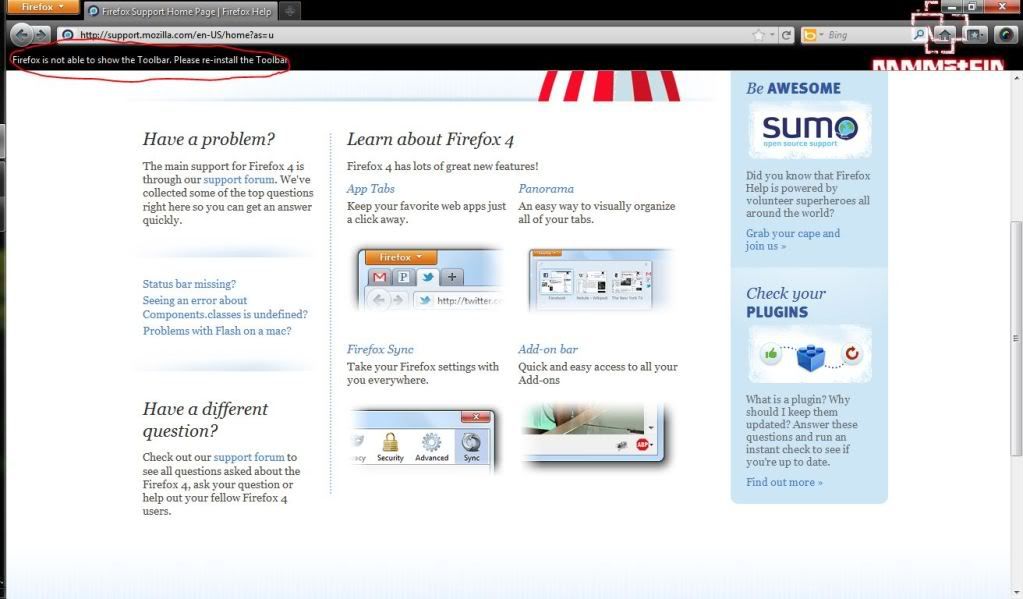
I'll add additional information if requested.
Modified by Mikko8
Chosen solution
That is also indicative of a problem with an add-on. Use the method in the link I posted previously to identify what one is causing the problem.
Read this answer in context 👍 1All Replies (3)
That indicates you have an incompatible add-on, possibly the AVG Security Toolbar.
Try disabling the AVG Security Toolbar to see if that stops the error. To do that in the Tools menu select Add-ons to open the add-ons manager. In the list of extensions click on the AVG Security Toolbar to select it, then click the Disable button. Restart Firefox to see if that helps.
The AVG Safe Search add-on may also not be compatible.
The following link gives furtehr details about how to troubleshoot this - https://support.mozilla.com/kb/Troubleshooting+extensions+and+themes
Modified by TonyE
I think it was disabled before the issue but your advice helped. Thank you!
What about the other issue? When an address typed, hitting "Enter" does not seem triggering the process. It works in forms though.
Chosen Solution
That is also indicative of a problem with an add-on. Use the method in the link I posted previously to identify what one is causing the problem.