


How to revert to previous UI?

Ok this latest UI appearance change is absolute dog feces. I hate it so much! It's so ugly! How do I change it back? I did not consent for my eyeballs to be assaulted like this. Did I mention it sucks? How do I change it back? 157.0.0.11
All Replies (11)
Yes, with every update Mozilla takes away a reason to use and to like Firefox. What is wrong with them? This UI update is absolute dog feces indeed. I managed to get rid of the puke gradient (who the hell though that was a good idea???) by installing a different theme and I shouldn't be installing third party themes for something like this. Now, I want to get rid of the rounded tabs.
I already have to use Chrome for some sites that don't work with Firefox and I don't need a lot to switch permanently and this garbage UI may just be the last straw. If I have to deal with garbage UI I might as well switch to Chrome, at least all websites work with it.
Please bring the option to revert to the old UI.
Chosen Solution
Web-address bar -> about:config -> ENTER -> search for nova -> double-click the line "browser.nova.enabled" -> "true" should change to "false" Anything else that says nova can be changed to false as well.
Modified by nunya biz
nunya biz said
Web-address bar -> about:config -> ENTER -> search for nova -> double-click the line "browser.nova.enabled" -> "true" should change to "false" Anything else that says nova can be changed to false as well.
Thank you!!!!!
They need to add this prominently to the main Appearance setting unless their goal is to alienate more users.
PS. Apparently, these about.config settings may be removed in the future. WTF Mozilla? Options is why people use Firefox. If you take away options there will be little reasons to stick to FF. As a FF user for over two decades your recent shortsightedness and various shenanigans makes me angry and sad.
Modified by ADZ
Bonjour
A space for users to give product feedback https://support.mozilla.org/en-US/kb/what-mozilla-connect
The new Firefox design lands in today. This is what you can expect https://connect.mozilla.org/t5/discussions/the-new-firefox-design-lands-in-today-this-is-what-you-can/td-p/139524
ADZ said
nunya biz said
Web-address bar -> about:config -> ENTER -> search for nova -> double-click the line "browser.nova.enabled" -> "true" should change to "false" Anything else that says nova can be changed to false as well.Thank you!!!!!
They need to add this prominently to the main Appearance setting unless their goal is to alienate more users.
PS. Apparently, these about.config settings may be removed in the future. WTF Mozilla? Options is why people use Firefox. If you take away options there will be little reasons to stick to FF. As a FF user for over two decades your recent shortsightedness and various shenanigans makes me angry and sad.
For a more permanent solution check out this official theme https://addons.mozilla.org/en-US/firefox/addon/firefox-proton/

The rounded design is so utterly ugly. It's unusable. It's good to have the solution with about:config, but if they removed that option one day, I'll be a former FF user instantely. I am preparing already... What has become of FF?

Thanks
Modified by hello78
Agent virtuel said
Bonjour A space for users to give product feedback https://support.mozilla.org/en-US/kb/what-mozilla-connect The new Firefox design lands in today. This is what you can expect https://connect.mozilla.org/t5/discussions/the-new-firefox-design-lands-in-today-this-is-what-you-can/td-p/139524
This just send you in a loop to a page full of slop text about Mozillas vision, it has no place to give any real feedback, just generic info, that then brings you to the support page, this new UI is awful, should be a simple on/off toggle

Hello. One workaround I found is using a policy json to *block* updates in the first place, to avoid Mozilla taking away this configuration in the future. And yes this new ui change pissed me off enough to create a Mozilla account to join this discussion, lol.
Anyways, this earlier question has the how-to. Basically copy the text into notepad and save, create a distribution folder and put in the json. https://support.mozilla.org/kn/questions/1304175
Bonjour
This other discussion https://support.mozilla.org/en-US/questions/1590804
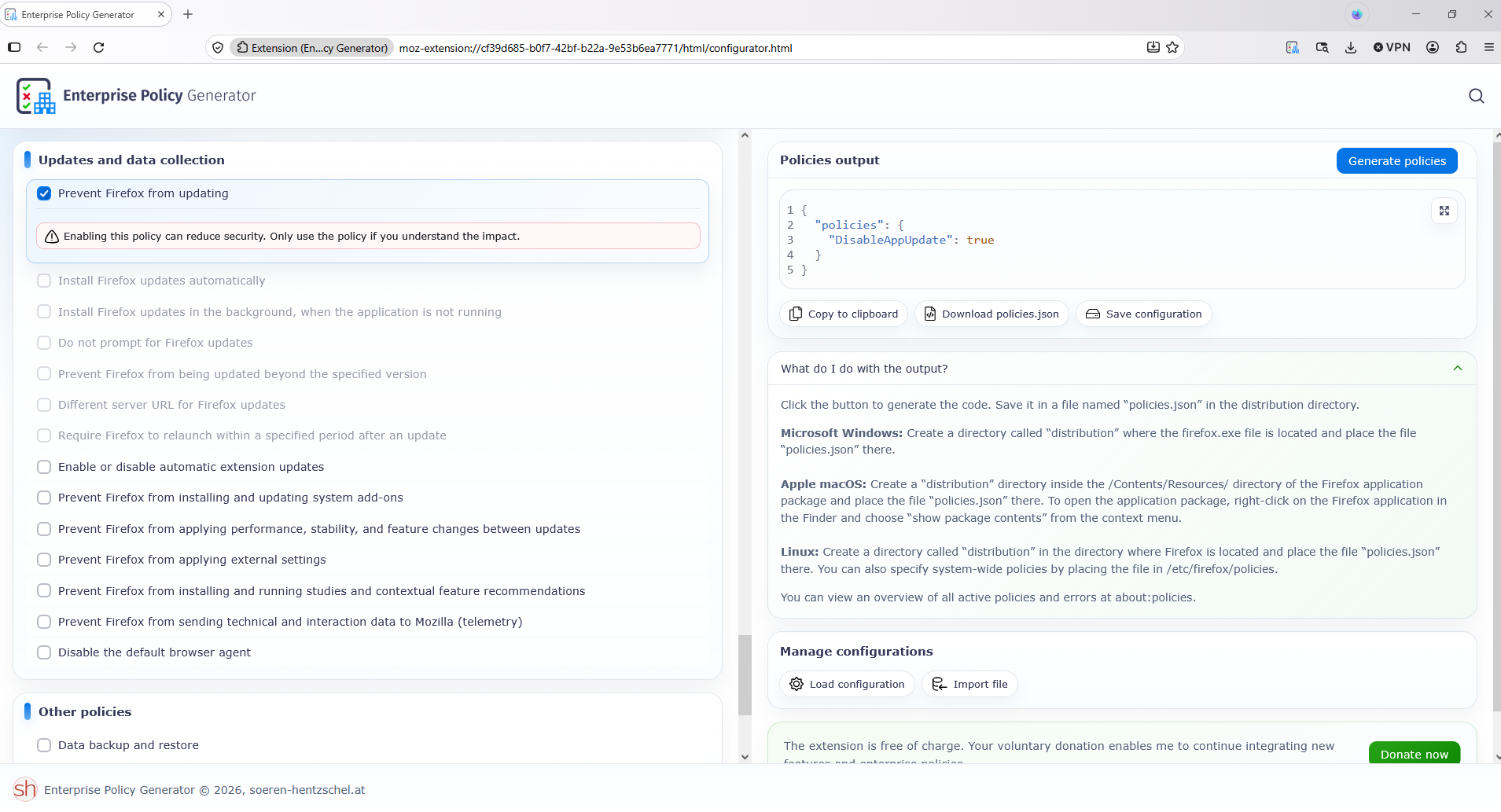
For information, since the release of Firefox 63, the option to Never check for updates was removed from about:preferences. You can use the DisableAppUpdate enterprise policy as a substitute. https://connect.mozilla.org/t5/discussions/upgrade-notification-spam/m-p/64080/highlight/true#M22529
If you want to try Enterprise Policy Generator https://addons.mozilla.org/firefox/addon/enterprise-policy-generator https://connect.mozilla.org/t5/discussions/enterprise-policy-generator-an-open-source-browser-based/td-p/127768
Modified by Agent virtuel
hello78, you have the possibility, submit an idea https://connect.mozilla.org/t5/ideas/idb-p/ideas, start a conversation https://connect.mozilla.org/t5/discussions/bd-p/discussions