


Windows 10 reached EOS (end of support) on October 14, 2025. If you are on Windows 10, see this article.

Search Support

Avoid support scams. We will never ask you to call or text a phone number or share personal information. Please report suspicious activity using the “Report Abuse” option.

Learn More

Can I change the default size of the sidebar?

  • 1 reply
  • 0 have this problem
  • 54 views
  • Last reply by acrdraft

I really enjoy using the recently added sidebar, but I want to put it away temporarily while watching videos. After some digging around, I finally found the simple keybind for expanding it (ctrl-alt-z). With the 'hide tabs and sidebar' option toggled, I'm able to open and close it at will, which is exactly what I wanted.

However, whenever I do this, the sidebar snaps to what I assume is its default size (picture 1). I usually use it at minimum size (picture 2,) such that only the icon of each tab shows. I tried to readjust it, but it seems to not snap to this size anymore unless I disable 'Hide Tabs and Sidebar.'

For now, I'm just going to temporarily toggle that setting on when I want it out of the way, and manually fix things later. But, is there a way I can have the best of both worlds? Can I make the 'default' the sidebar snaps to the minimum size I usually use from Picture 2?

Thank you in advance.
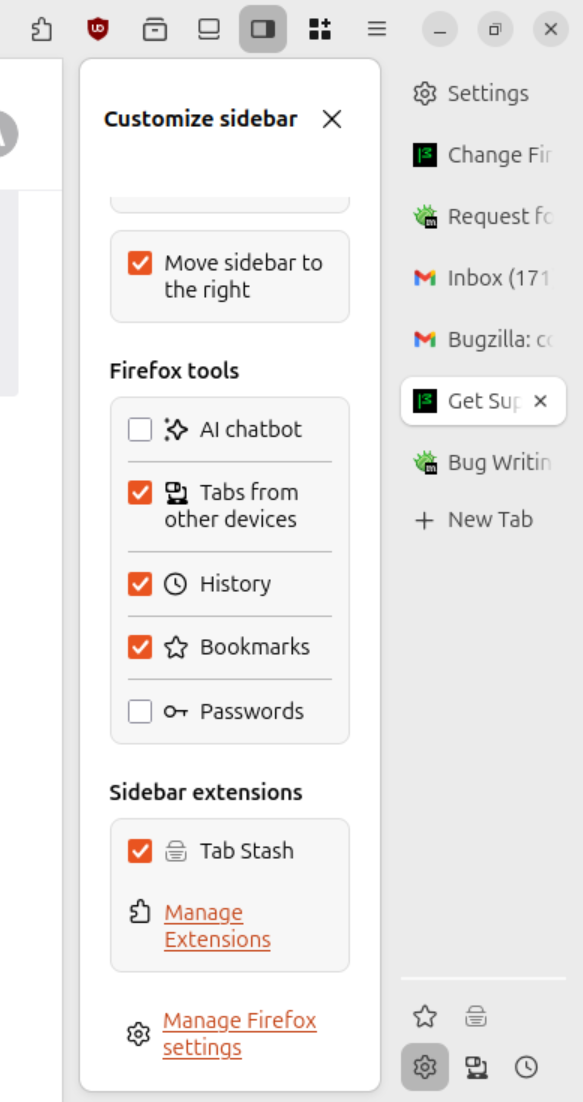
I really enjoy using the recently added sidebar, but I want to put it away temporarily while watching videos. After some digging around, I finally found the simple keybind for expanding it (ctrl-alt-z). With the 'hide tabs and sidebar' option toggled, I'm able to open and close it at will, which is exactly what I wanted. However, whenever I do this, the sidebar snaps to what I assume is its default size (picture 1). I usually use it at minimum size (picture 2,) such that only the icon of each tab shows. I tried to readjust it, but it seems to not snap to this size anymore unless I disable 'Hide Tabs and Sidebar.' For now, I'm just going to temporarily toggle that setting on when I want it out of the way, and manually fix things later. But, is there a way I can have the best of both worlds? Can I make the 'default' the sidebar snaps to the minimum size I usually use from Picture 2? Thank you in advance. ''<I've edited the question to remove a leading space - c>''
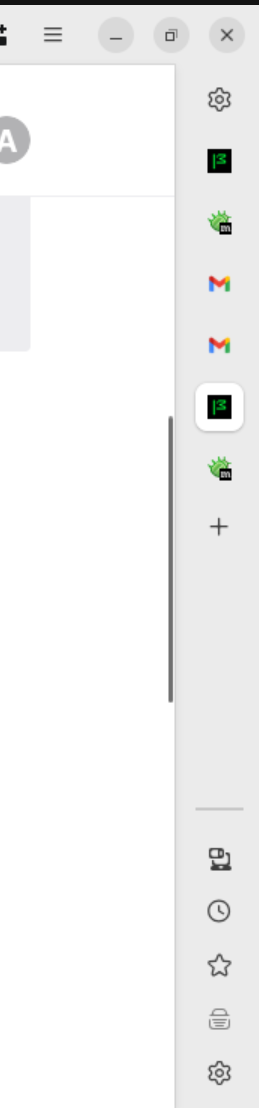
Attached screenshots

Modified by cor-el

All Replies (1)

Apologies for the formatting issues, not sure how that happened in the second paragraph. The text is: "However, whenever I do this, the sidebar snaps to what I assume is its default size (picture 1). I usually use it at minimum size (picture 2,) such that only the icon of each tab shows. I tried to readjust it, but it seems to not snap to this size anymore unless I disable 'Hide Tabs and Sidebar.'"

Ask a question

You must log in to your account to reply to posts. Please start a new question, if you do not have an account yet.