


How to I prevent icons from appearing on the Firefox dashboard every time I open a link?

Every time I open a story in Firefox, it adds an icon to the dashboard. How do I prevent that?
All Replies (6)
Hi David,
I'm not sure what you're referring with adding an icon to the dashboard. Can you share a screenshot to help us understand the context better?
file:///C:/Users/User/Downloads/Screenshot%202026-03-02%20at%2001-14-50%20New%20Tab.png
Does this help? If not, having taken a screenshot, how do I post it to "Post a Reply"?
Hi David,
To help you with creating a screenshot, please see How do I create a screenshot of my problem?
Once you've done this, attach the saved screenshot file to your forum post by clicking the Browse... button below the Post your reply box. This will help us to visualize the problem.
Thank you!
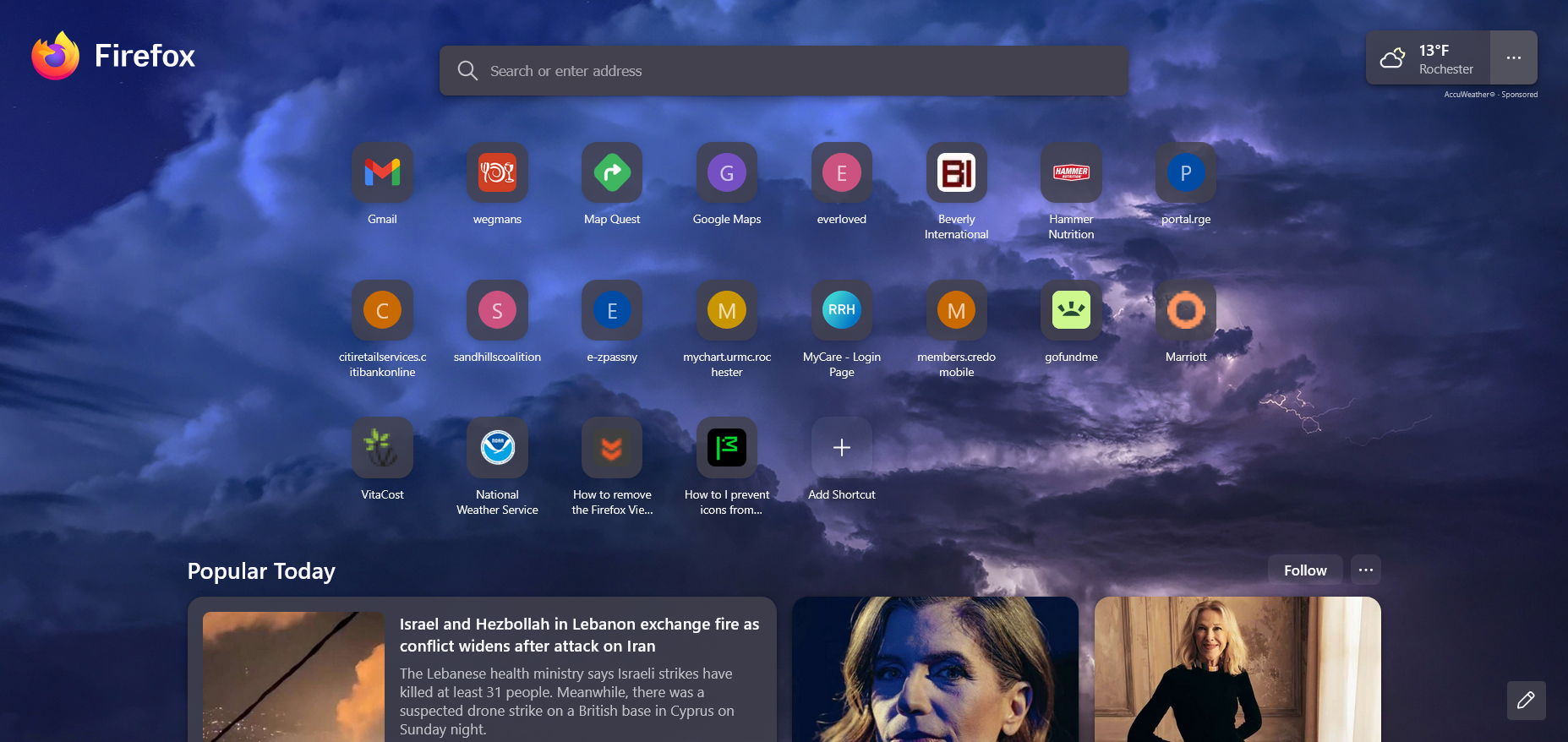
Aha. That's called the Firefox shortcuts. You may want to check out this article to learn more about how to customize it.
I want the 19 shortcuts that I have included in three rows; I don't want to change from having three row, but I don't want a shortcut to show up every time I open a new tab on, e.g. Firefox.
The article that you referenced tells me to:
Open a new tab.
Click the customize icon (New Tabs setting button) in the bottom right.
Uncheck Personalized stories based on your activity if you want to disable automated personalization, once the feature is available.
Toggle Stories if you want to turn off stories altogether.
Where do I find Personalized Stories Based on Your (My) Activity?