

This thread was archived.
Please ask a new question if you need help.

Solved
Archived
Paste value only in Google Sheets not functioning properly in Firefox

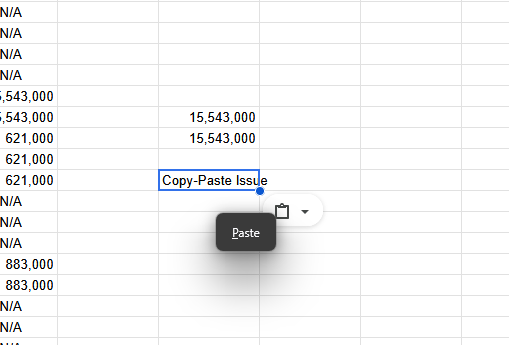
When copying from an outside tab then use paste value only into a Google Sheets tab, whether using shortcut or the drop down menu, it seems to first paste properly then show a "paste" dialog box that couldn't be removed. Any other input seems to paste again, taking from the last copy before the current one. Copying from another Google Sheets tab seems to have the same result but instead of the dialog box, it double paste, as described previously, immediately. Testing in Chrome seems to work as usual and clearing the cache has not help. Issues seems to arise since the latest update to Firefox.
When copying from an outside tab then use paste value only into a Google Sheets tab, whether using shortcut or the drop down menu, it seems to first paste properly then show a "paste" dialog box that couldn't be removed. Any other input seems to paste again, taking from the last copy before the current one. Copying from another Google Sheets tab seems to have the same result but instead of the dialog box, it double paste, as described previously, immediately. Testing in Chrome seems to work as usual and clearing the cache has not help. Issues seems to arise since the latest update to Firefox.
All Replies (3)

Chosen Solution
This should be fixed now. Please confirm if it is.
Confirm that this is fixed. Thank you.
Hi, it isn't fixed for me.