


DNS over HTTPS at Max Protection Prevents Websites From Loading
When I opened up Firefox this evening, websites stopped working if "DNS over HTTPS" is set to "Max Protection". In some instances, such as YouTube, the website loads, but it acts like you're offline and tells me to turn on my Wi-Fi even though it's already on and running fine. Weirdly, it seems that setting DNS over HTTPS to Max Protection, loading a website, set DNS over HTTPS to a lower setting, and then reloading the website fixes the issue, but it'd still be nice if we didn't have to go through the hassle at all. Thank you for your time and patience.
Sincerely, Watching Forests
Chosen solution
Hi,
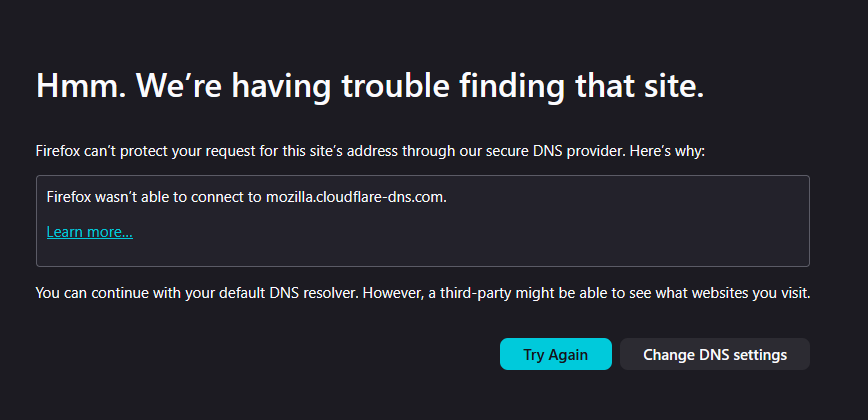
As your screenshot indicates, your Firefox can't connect to mozilla.cloudflare-dns.com, the set DNS resolver. Setting DNS over HTTPS to a lower protection level just lets Firefox fall back to your default local DNS resolver.
The actual issue is that mozilla.cloudflare-dns.com is inaccessible for some reason. Can you just load it in Firefox? In a different browser?
Read this answer in context 👍 1All Replies (2)
Chosen Solution
Hi,
As your screenshot indicates, your Firefox can't connect to mozilla.cloudflare-dns.com, the set DNS resolver. Setting DNS over HTTPS to a lower protection level just lets Firefox fall back to your default local DNS resolver.
The actual issue is that mozilla.cloudflare-dns.com is inaccessible for some reason. Can you just load it in Firefox? In a different browser?