Emails stuck in Outbox

My Samsung S22 android with Thunderbird app email account keeps getting emails stuck in Outbox. Type of stuck email varies, some have attachments, some do not. No amount of "Send all emails" tapping will send them. I have to send them to my draft folder, then resend them, which they usually go thru. My laptop does not have this issue as its Thunderbird has NO Outbox. This is VERY FRUSTRATING as I constantly discover emails stuck in Outbox DAYS after I thought they'd been sent. I'm using IMAP and have the correct STMP settings recommended ny Xfinity (comcast.net) email host. Im on the verge of DUMPING Thunderbird for this issue!!!
All Replies (2)

Hi RE777
If you google "Comcast email stuck in outbox", you'll find many reports of this issue across different email clients. I think Thunderbird Android being the cause is unlikely based on this.
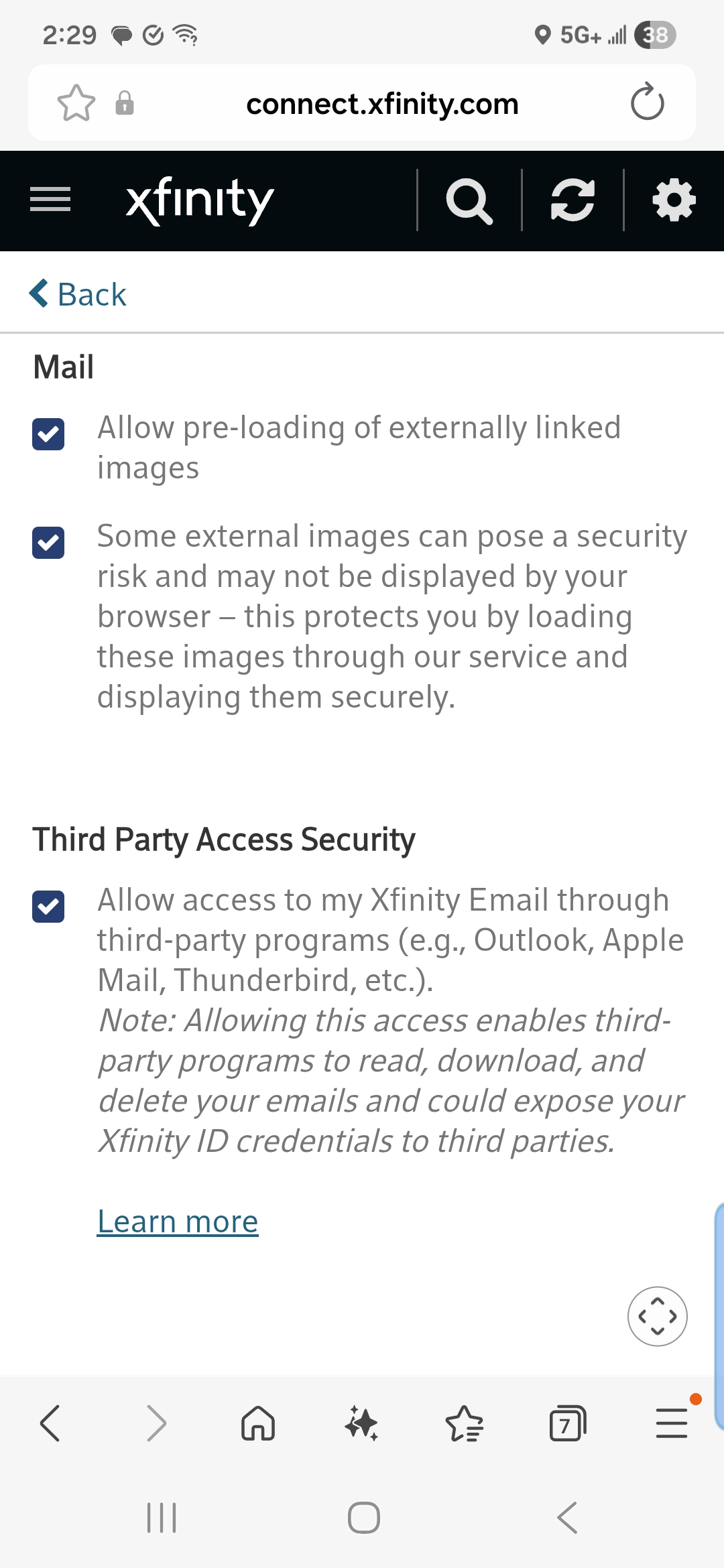
Xfinity's website suggests the following.
- Sign in to Xfinity Email using your Xfinity ID and password.
- In the top-right corner, click the Gear icon, then select Settings.
- Click Security.
- Uncheck the box under Third Party Access Security to prevent third-party programs access to your Xfinity Email, or check the box to allow access.
If you have Thunderbird desktop working, you likely already have this box checked.
Sorry I can't help further, other community member's may be able to offer additional suggestions.