


How do I minimize the web page? There is no icon for it. Now, I've attached a screen shot that does not show an icon of other means of minimizing that screen.

How do I minimize the web page when I don't see the usual icon at the top of the page. Now, I've attached a screen shot that does not show any icon of other means of minimizing that screen. I'm running Windows 11 and WORD 2021.
The screen appears on Opera and Google Chrome with the icons. Thanks.
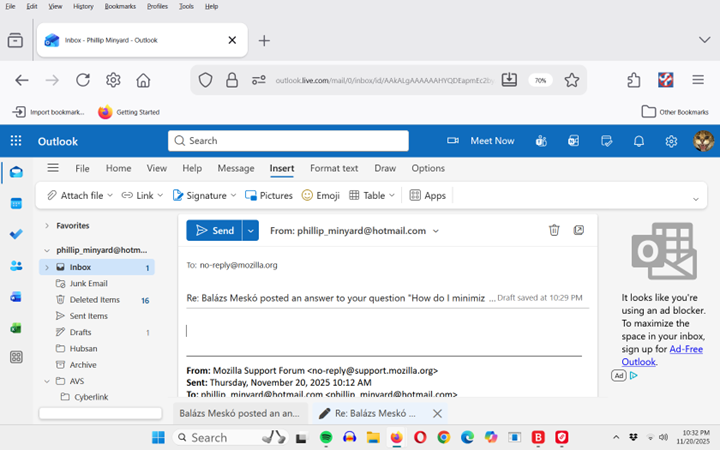
Modified by phillip_minyard
All Replies (2)

Hi!
Could you help us figure out what do you mean exactly? I screenshot could be most useful, or at least a description how do you get into that situation, what do you see, and what do you expect to see instead.
Regards, Balázs

I have the same problem and am running Windows 11 Pro. The problem started after a recent update to Firefox. I am currently fully up to date with Firefox. I've discovered that the problem is that the very top band which normally appears when I open Firefox does not appear. This is the band that includes the Firefox icon on the left and minimization, maximization and off symbols on the right. As suggested in another reply I created a new profile and that did not have this problem. I have also found that if I open a new window under the additional settings symbol the top band appears. Once I shut Firefox down and then restart it the upper band does not reappear until I again create a new widow. How so I get the top band to appear when I open Firefox?