

This thread was archived.
Please ask a new question if you need help.

Solved
Archived
Duplicate Sent folders
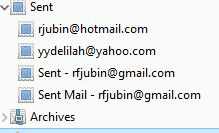
Thunderbird has created a duplicate "Sent" folder for one of my accounts (gmail) that I can't get rid of. It's driving me nuts. I've tried deleting the account and restoring it but the duplicate reappears (see image). Anyone help..
Thunderbird has created a duplicate "Sent" folder for one of my accounts (gmail) that I can't get rid of. It's driving me nuts.
I've tried deleting the account and restoring it but the duplicate reappears (see image).
Anyone help..
All Replies (3)
Chosen Solution
Sorted - opened my Gmail account in a browser and deleted the Imap Sent folder. Deleted my Thunderbird Gmail account and then reinstalled it and now everything is fine.
I don't know if it's relevant, but since gmail (and outlook.com) automatically copy sent messages to Sent, you should uncheck 'Place a copy in' in the Copies & Folders section in Account Settings to avoid duplicates in Sent.
All sorted now thanks.