


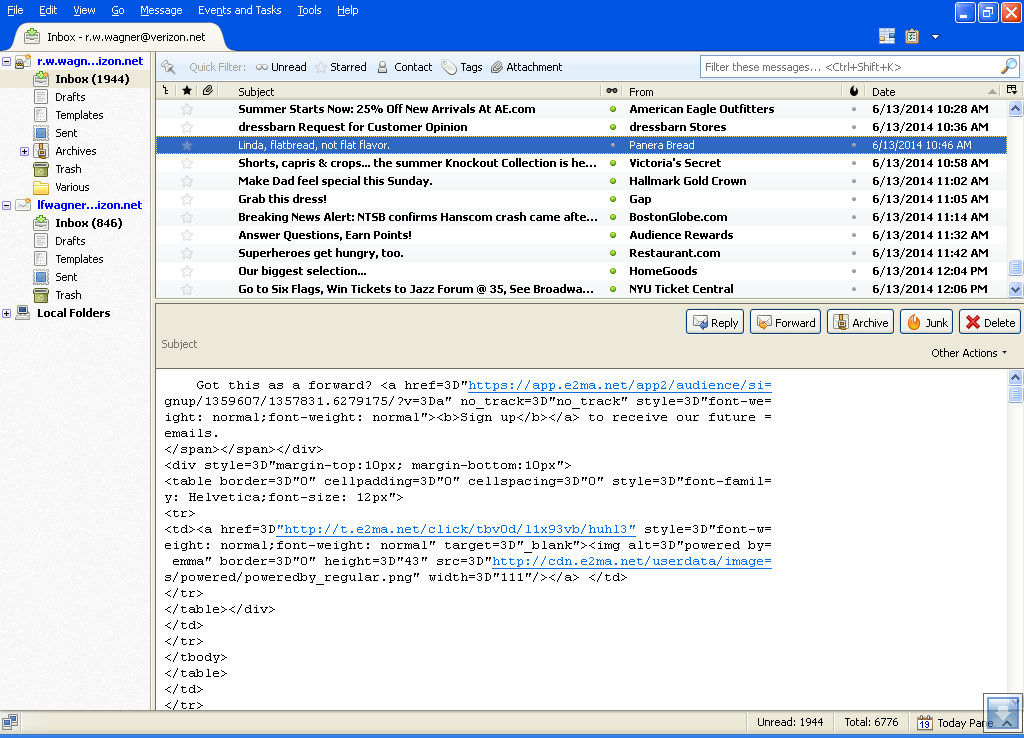
For a period of time, my email messages appear with the code (Java?). How do I obtain the actual email messages from this format?

In the message box, such lines as From ...;X ...;X ...;Return-path:;Received ... etc. appear. The actual text is present but buried within this code. How do I get the message without the code embedded? This problem occurred and previously properly received emails had this problem in the message window. Recently, the problem went away. I'm perplexed why the problem occurred and how tho correct it for the "bad" messages. Thanks
Chosen solution
Right click the folder, select properties and then the repair button.
Read this answer in context 👍 0All Replies (8)

View (Alt-V) - Headers - Normal
The Headers have been set at Normal. The problem still exists.
Can you provide a screenshot of your problem?
http://support.mozilla.org/en-US/kb/how-do-i-create-screenshot-my-problem
Here is the requested screen shot.
View - Message Body As - Original HTML
Message body was originally set and remains as Original HTML. Still no resolution to the problem.
Chosen Solution
Right click the folder, select properties and then the repair button.
It worked. Thank you very much!!