


I cannot open Thunderbird on my laptop because it asks for a password from my defunct BlueHost account.

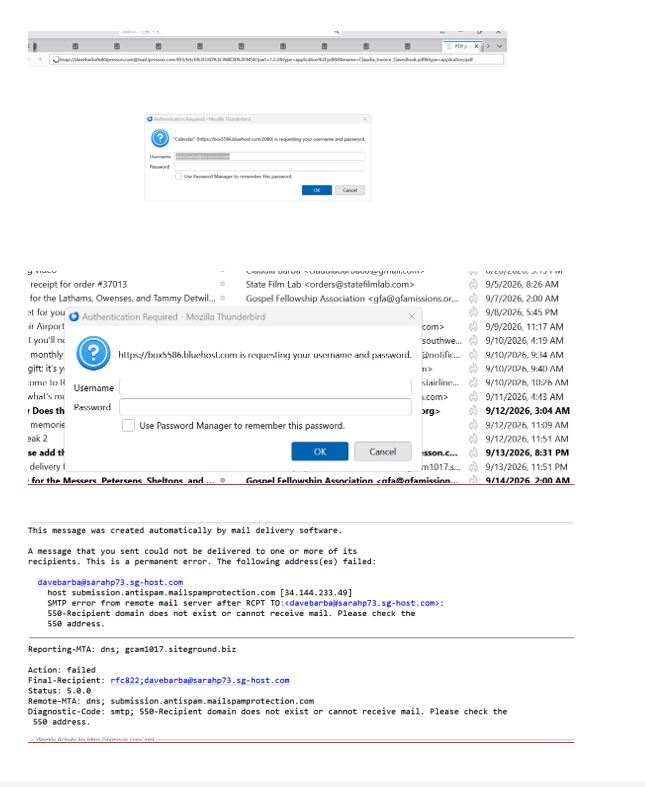
I keep getting the following (see attached image) when I try to open my Thunderbird. I tried to unsuccessfully open safe mode because it still asks for a password from my very old BlueHost account. I previously worked with AI on this and deleted all BlueHost lines I could find in my account. View the image I have included and see all the messages that include BlueHost. They must be hiding somewhere in Thunderbird. I am not sure what version I have because I cannot open it. Please help! I be happy to send you my phone number is needed.
All Replies (1)

Your screen shot is pretty blurry, but luckily I can see that one password it's looking for is for an online calendar. Go to the Calendars tab (Alt+3) and check the list of calendars. I expect you will see the Bluehost one there - select it, then click the 3-dot options menu and choose "Unsubscribe Calendar".
Also check:
- Address Books (Alt+2) for similar entries,
- Accounts List (see <Account Settings> and make sure that account has been removed)
- SMTP servers (<accounts settings | outgoing server (found at the bottom of accounts list) < p></accounts>
- <Settings | Privacy & Security | Passwords | Saved Passwords> and delete any Bluehost entries.