


Need help recovering my profile from a zip file

Not sure if I picked the correct topic for this...
I had to reinstall Windows 11 on my PC as the old copy was corrupt to the point I could not install updates, even with Microsoft's help. Before I made the plunge, I used Tools -> Export to create a zip file on my D:. After installing Thuderbird on the rebuilt copy, I went to Tools -> Import to recover everything.
About 19% in, I received error "Import failed unexpectedly, more information may be available in the Error Console." I found the Error Console but don't know how top proceed.
Initial messages: module is not a constructor ExtensionCommon.sys.mjs:1679:15 EmptyDatabaseError: "blocklists/addons-bloomfilters" has not been synced yet Database.sys.mjs:19:5 NS_ERROR_ABORT: Password dialog canceled 2 MsgIncomingServer.sys.mjs:923:24
Messages at the bottom of the console: Uncaught (in promise) NS_ERROR_FILE_NOT_FOUND: Component returned failure code: 0x80520012 (NS_ERROR_FILE_NOT_FOUND) [nsIFile.copyTo]
   _recursivelyCopyMsgFolder resource:///modules/ThunderbirdProfileImporter.sys.mjs:781
   _recursivelyCopyMsgFolder resource:///modules/ThunderbirdProfileImporter.sys.mjs:772
   _mergeLocalFolders resource:///modules/ThunderbirdProfileImporter.sys.mjs:745
   _importServersAndAccounts resource:///modules/ThunderbirdProfileImporter.sys.mjs:354
ThunderbirdProfileImporter.sys.mjs:781:19 1785523577301 Toolkit.Telemetry ERROR TelemetrySend::_doPing - error making request to https://incoming-telemetry.thunderbird.net/submit/telemetry/26c785ea-2226-4024-9b0e-cf44ce2860f7/first-shutdown/Thunderbird/153.0.1/release/20260728090639?v=4: eUnreachable Log.sys.mjs:722 1785523577301 Toolkit.Telemetry ERROR TelemetrySend::sendPersistedPings - failed to send ping 26c785ea-2226-4024-9b0e-cf44ce2860f7: {"isTrusted":true} Log.sys.mjs:722 1785523577302 Toolkit.Telemetry ERROR TelemetrySend::_doPing - error making request to https://incoming-telemetry.thunderbird.net/submit/telemetry/bc5b8fd6-8907-4169-9e98-2c732d265c20/main/Thunderbird/153.0.1/release/20260728090639?v=4: eUnreachable Log.sys.mjs:722 1785523577302 Toolkit.Telemetry ERROR TelemetrySend::sendPersistedPings - failed to send ping bc5b8fd6-8907-4169-9e98-2c732d265c20: {"isTrusted":true} Log.sys.mjs:722 1785523577302 Toolkit.Telemetry ERROR TelemetrySend::_doPing - error making request to https://incoming-telemetry.thunderbird.net/submit/telemetry/01ee7ef8-942d-4fbd-a404-debd99ad5e4d/new-profile/Thunderbird/153.0.1/release/20260728090639?v=4: eUnreachable Log.sys.mjs:722 1785523577302 Toolkit.Telemetry ERROR TelemetrySend::sendPersistedPings - failed to send ping 01ee7ef8-942d-4fbd-a404-debd99ad5e4d: {"isTrusted":true} Log.sys.mjs:722 1785523577325 Toolkit.Telemetry ERROR TelemetrySend::_doPing - error making request to https://incoming-telemetry.thunderbird.net/submit/telemetry/1f64b615-ed65-4a65-8853-7bd3e3077b54/health/Thunderbird/153.0.1/release/20260728090639?v=4: eUnreachable Log.sys.mjs:722 1785523577330 Toolkit.Telemetry ERROR TelemetrySend::_doPing - error making request to https://incoming-telemetry.thunderbird.net/submit/telemetry/26c785ea-2226-4024-9b0e-cf44ce2860f7/first-shutdown/Thunderbird/153.0.1/release/20260728090639?v=4: eUnreachable Log.sys.mjs:722 1785523577330 Toolkit.Telemetry ERROR TelemetrySend::sendPersistedPings - failed to send ping 26c785ea-2226-4024-9b0e-cf44ce2860f7: {"isTrusted":true} Log.sys.mjs:722 1785523577331 Toolkit.Telemetry ERROR TelemetrySend::_doPing - error making request to https://incoming-telemetry.thunderbird.net/submit/telemetry/bc5b8fd6-8907-4169-9e98-2c732d265c20/main/Thunderbird/153.0.1/release/20260728090639?v=4: eUnreachable Log.sys.mjs:722 1785523577331 Toolkit.Telemetry ERROR TelemetrySend::sendPersistedPings - failed to send ping bc5b8fd6-8907-4169-9e98-2c732d265c20: {"isTrusted":true} Log.sys.mjs:722 1785523577331 Toolkit.Telemetry ERROR TelemetrySend::_doPing - error making request to https://incoming-telemetry.thunderbird.net/submit/telemetry/01ee7ef8-942d-4fbd-a404-debd99ad5e4d/new-profile/Thunderbird/153.0.1/release/20260728090639?v=4: eUnreachable Log.sys.mjs:722 1785523577331 Toolkit.Telemetry ERROR TelemetrySend::sendPersistedPings - failed to send ping 01ee7ef8-942d-4fbd-a404-debd99ad5e4d: {"isTrusted":true} Log.sys.mjs:722 1785523577334 Toolkit.Telemetry WARN TelemetryStorage::_scanArchive - have seen this id before: 1f64b615-ed65-4a65-8853-7bd3e3077b54, overwrite: false pop3.server1.1: NetworkTimeoutError: a Network error occurred Pop3Client.sys.mjs:381:18 pop3.server1.1: SecurityError info: Pop3Client.sys.mjs:441:20 pop3.server1.1: SecurityError cert chain: imap.email.comcast.net; serial# 5F:F9:03:A2:A2:B8:A3:45:AE:17:FE:A1:C9:15:D6:45 <- Norton Web/Mail Shield Root; serial# 2F:61:CC:98:EC:34:F2:43:99:93:5B:E6:A0:A5:DF:E2 Pop3Client.sys.mjs:446:22 1785523697961 Toolkit.Telemetry ERROR TelemetrySend::_doPing - error making request to https://incoming-telemetry.thunderbird.net/submit/telemetry/1f64b615-ed65-4a65-8853-7bd3e3077b54/health/Thunderbird/153.0.1/release/20260728090639?v=4: eUnreachable Log.sys.mjs:722 1785523697961 Toolkit.Telemetry ERROR TelemetrySend::sendPersistedPings - failed to send ping 1f64b615-ed65-4a65-8853-7bd3e3077b54: {"isTrusted":true} Log.sys.mjs:722 1785523697962 Toolkit.Telemetry ERROR TelemetrySend::_doPing - error making request to https://incoming-telemetry.thunderbird.net/submit/telemetry/26c785ea-2226-4024-9b0e-cf44ce2860f7/first-shutdown/Thunderbird/153.0.1/release/20260728090639?v=4: eUnreachable Log.sys.mjs:722 1785523697962 Toolkit.Telemetry ERROR TelemetrySend::sendPersistedPings - failed to send ping 26c785ea-2226-4024-9b0e-cf44ce2860f7: {"isTrusted":true} Log.sys.mjs:722 1785523697962 Toolkit.Telemetry ERROR TelemetrySend::_doPing - error making request to https://incoming-telemetry.thunderbird.net/submit/telemetry/bc5b8fd6-8907-4169-9e98-2c732d265c20/main/Thunderbird/153.0.1/release/20260728090639?v=4: eUnreachable Log.sys.mjs:722 1785523697962 Toolkit.Telemetry ERROR TelemetrySend::sendPersistedPings - failed to send ping bc5b8fd6-8907-4169-9e98-2c732d265c20: {"isTrusted":true} Log.sys.mjs:722 1785523697963 Toolkit.Telemetry ERROR TelemetrySend::_doPing - error making request to https://incoming-telemetry.thunderbird.net/submit/telemetry/01ee7ef8-942d-4fbd-a404-debd99ad5e4d/new-profile/Thunderbird/153.0.1/release/20260728090639?v=4: eUnreachable Log.sys.mjs:722 1785523697963 Toolkit.Telemetry ERROR TelemetrySend::sendPersistedPings - failed to send ping 01ee7ef8-942d-4fbd-a404-debd99ad5e4d: {"isTrusted":true} Log.sys.mjs:722 1785523947429 Toolkit.Telemetry ERROR TelemetrySend::_doPing - error making request to https://incoming-telemetry.thunderbird.net/submit/telemetry/1f64b615-ed65-4a65-8853-7bd3e3077b54/health/Thunderbird/153.0.1/release/20260728090639?v=4: eUnreachable Log.sys.mjs:722 1785523947429 Toolkit.Telemetry ERROR TelemetrySend::sendPersistedPings - failed to send ping 1f64b615-ed65-4a65-8853-7bd3e3077b54: {"isTrusted":true} Log.sys.mjs:722 1785523947430 Toolkit.Telemetry ERROR TelemetrySend::_doPing - error making request to https://incoming-telemetry.thunderbird.net/submit/telemetry/26c785ea-2226-4024-9b0e-cf44ce2860f7/first-shutdown/Thunderbird/153.0.1/release/20260728090639?v=4: eUnreachable Log.sys.mjs:722 1785523947431 Toolkit.Telemetry ERROR TelemetrySend::sendPersistedPings - failed to send ping 26c785ea-2226-4024-9b0e-cf44ce2860f7: {"isTrusted":true} Log.sys.mjs:722 1785523947431 Toolkit.Telemetry ERROR TelemetrySend::_doPing - error making request to https://incoming-telemetry.thunderbird.net/submit/telemetry/bc5b8fd6-8907-4169-9e98-2c732d265c20/main/Thunderbird/153.0.1/release/20260728090639?v=4: eUnreachable Log.sys.mjs:722 1785523947431 Toolkit.Telemetry ERROR TelemetrySend::sendPersistedPings - failed to send ping bc5b8fd6-8907-4169-9e98-2c732d265c20: {"isTrusted":true} Log.sys.mjs:722 1785523947431 Toolkit.Telemetry ERROR TelemetrySend::_doPing - error making request to https://incoming-telemetry.thunderbird.net/submit/telemetry/01ee7ef8-942d-4fbd-a404-debd99ad5e4d/new-profile/Thunderbird/153.0.1/release/20260728090639?v=4: eUnreachable Log.sys.mjs:722 1785523947431 Toolkit.Telemetry ERROR TelemetrySend::sendPersistedPings - failed to send ping 01ee7ef8-942d-4fbd-a404-debd99ad5e4d: {"isTrusted":true} Log.sys.mjs:722
I have an image copy of my old installation. Can I simply locate the Thunderbird profile on the backup and restore it?
All Replies (17)

You can unzip the exported file and copy your profile (a folder, usually with a name like kdt75thf3w.default) from it into %AppData%\Thunderbird\Profiles\
Then re-start Thunderbird.
If you do not see your accounts and folders, go to the "Help" menu > Troubleshooting information > about:profiles and set the copied profile as the default profile.

I have an image copy of my old installation. Can I simply locate the Thunderbird profile on the backup and restore it?
Yes , shutdown Thunderbird on the old PC, and copy the entire profile directory tree over the new pc to the same location ( assuming that you have the same version of Thunderbird on both sides and using the windows username on both sides and you use IMAP configuration )
Modified by Michel T
Michel T said
Yes , shutdown Thunderbird on the old PC, and copy the entire profile directory tree over the new pc to the same location ( assuming that you have the same version of Thunderbird on both sides and using the windows username on both sides )Is there an old PC and a new PC in this scenario? I see a re-built PC, an exported profile, and an image back-up.
But if the image back-up is current enough, copying the whole profile directory from it to the re-built PC would indeed be better than my first suggestion. Michel, that would be %AppData%\Thunderbird\Profiles\, right?
If the exported profile is more current and has important data that the image back-up does not have, and if you have only one profile or care only about that one exported profile, then I believe that my first suggestion is what you want to do.
Unless I am misunderstanding something?
Rick said
Michel T said
Yes , shutdown Thunderbird on the old PC, and copy the entire profile directory tree over the new pc to the same location ( assuming that you have the same version of Thunderbird on both sides and using the windows username on both sides )Is there an old PC and a new PC in this scenario? I see a re-built PC, an exported profile, and an image back-up.
But if the image back-up is current enough, copying the whole profile directory from it to the re-built PC would indeed be better than my first suggestion. Michel, that would be %AppData%\Thunderbird\Profiles\, right?
If the exported profile is more current and has important data that the image back-up does not have, and if you have only one profile or care only about that one exported profile, then I believe that my first suggestion is what you want to do.
Unless I am misunderstanding something?
I mixed up with another thread.
Regarding this post, the user has trouble with import from an export previously done so I presume that the export file might be corrupted .
So using the backup image should be fine assuming that IMAP is being used.
Rick,
I tried what you suggested and copied the file from the zip file to %AppData%\Thunderbird\Profiles\, but Thunderbird won't use the profile. I even tried win+r to launch the profile manager ('thunderbird -p'). The copied profile isn't showing up.
Michel T, I had to reinstall windows on my current computer and don't know what the previous Thunderbird version was. The interface on this version is vastly different than my old version.
Not sure where to go from here. I really don't want to lose all of my saved emails and contact lists.
I appreciate your help.
Anyway to get an older version of Thunderbird? My previous thunderbird.exe is 443KB while the current one is 498KB.
My setting for my comcast email is POP.
raylink said
I tried what you suggested and copied the file from the zip file to %AppData%\Thunderbird\Profiles\, but Thunderbird won't use the profile. I even tried win+r to launch the profile manager ('thunderbird -p'). The copied profile isn't showing up.
What exactly did you copy?
Does your profile appear in about:profiles?
Raylink,
Don't read the following, just continue to work with Rick
Use these info for later on if needed.
====================================================
1) To find the version of your original Thunderbird : Go to profile directory of your image backup and examine file compatibility.ini and look for LastVersion=<This_should_be_the_version_of_Thunderbird>
2) All thunderbird versions can be found here ( you just need to pick the right platform and language ) : https://ftp.mozilla.org/pub/thunderbird/releases/
3) As long as you keep the image backup you should be ok with older emails
4) You should be thinking of changing from POP to IMAP eventually to void troubles with eventual recovery. Please read this to understand the different between POP and IMAP : https://support.mozilla.org/en-US/kb/difference-between-imap-and-pop3
Modified by Michel T
Rick,
I copied the entire contents of D:\Thunderbird_profile_backup.zip\pghy27s4.default to C:\Users\rayli\AppData\Roaming\Thunderbird\Profiles.
C:\Users\rayli\AppData\Roaming\Thunderbird\Profiles contains folders: 3jw2pn2i.pghy27s4.default obizm2nh.default-release pghy27s4.default wmnls64f.default
I added pghy27s4.default to about:profiles and made it the default.
The original profiles in about:profiles were: Root directory C:\Users\rayli\AppData\Roaming\Thunderbird\Profiles\obizm2nh.default-release
and
Root directory C:\Users\rayli\AppData\Roaming\Thunderbird\Profiles\wmnls64f.default
I ahve now tried using a restore of pghy27s4.default from my imagecopy. Thunderbird does not contain any of my previous data while being set to
Profile: pghy27s4.default This is the profile in use and it cannot be deleted.
Thanks for your help. I really appreciate it.
raylink said
I copied the entire contents of D:\Thunderbird_profile_backup.zip\pghy27s4.default to C:\Users\rayli\AppData\Roaming\Thunderbird\Profiles. C:\Users\rayli\AppData\Roaming\Thunderbird\Profiles contains folders: 3jw2pn2i.pghy27s4.default obizm2nh.default-release pghy27s4.default wmnls64f.default I added pghy27s4.default to about:profiles and made it the default. The original profiles in about:profiles were: Root directory C:\Users\rayli\AppData\Roaming\Thunderbird\Profiles\obizm2nh.default-release and Root directory C:\Users\rayli\AppData\Roaming\Thunderbird\Profiles\wmnls64f.default I ahve now tried using a restore of pghy27s4.default from my imagecopy. Thunderbird does not contain any of my previous data while being set to Profile: pghy27s4.default This is the profile in use and it cannot be deleted. Thanks for your help. I really appreciate it.
It's not clear to me what happened with the copy. Do you really mean that you copied the contents of pghy27s4.default? Or did you copy the pghy27s4.default directory? It seems that you copied the directory, which is what we wanted.
And you were able to set that profile as the default. Then what happened when you opened Thunderbird? Thunderbird is telling you that it is in use, but you wrote that "Thunderbird won't use the profile".
So you moved on to the image copy. What did you copy from where to where? What happened?
I dragged the directory pghy27s4.default from the zip file to C:\Users\rayli\AppData\Roaming\Thunderbird\Profiles. I did grab the entire directory and not just the contents.
Yes, the copied profile directory is selected as being in use.
Earlier today (previous installation of Windows and Thunderbird) i had about 25 files in my Inbox, now I have 6 that were downloaded after the install. I also had 2 Contact lists as well as a Local folder that had about 30 subfolders in it with probably over 5,000 saved emails. None of that info is present.
From my image file, I copied C:\Users\rayli\AppData\Roaming\Thunderbird\Profiles\pghy27s4.default to C:\Users\rayli\AppData\Roaming\Thunderbird\Profiles on the PC while Thunderbird was not running.
Would it be worth trying to obtain and install my previous version of Thunderbird as suggested by Michel? What is weird is that I installed 153.0.1 today - compatibility.inf file from the imagecopy contains [Compatibility] LastVersion=153.0_20260717002111/20260717002111 LastOSABI=WINNT_x86_64-msvc LastPlatformDir=C:\Program Files\Mozilla Thunderbird LastAppDir=C:\Program Files\Mozilla Thunderbird
I'm almost frustrated to the point of restoring my C: drive from the imagecopy in order to determine the version that was installed. Then starting this multi-hour reinstall all over again.
Thanks once again. I think I am finished messing around with this today and will check back in tomorrow.
Three ideas:
1. Let's check what is in that profile. Please open the instance of pghy27s4.default that is in the unzipped folder and post a screen image of the contents of the ImapMail directory and another screen image of the contents of the Mail\Local Folders directory and a third screen image of the contents of any other account in the Mail directory. Redact if necessary.
2. I don't know about compatibility issues with older versions or how useful installing an older version of Thunderbird would be. Please follow Michel's guidance on that.
3. There is another way to get messages from the unzipped profile. Step 1 above would confirm that the messages are in that profile. Then you would install the ImportExportToolsNG add-on and import messages from a copy of your profile into an active profile in Thunderbird. I don't know any reason why the version of Thunderbird would matter in this approach. Then we could try copying your contacts to the active profile through the file system.
Let's keep the option of re-installing the whole C: drive in mind. If your image copy is recent, that should work, right? I could not guide you in the re-installation. You seem to know what you're doing.
While we're working on this problem, I believe that you should tell Thunderbird in account settings to leave POP messages on the server. That might reduce the risk of losing messages. I don't use POP and keep exceeding my knowledge of it. Michel, do you agree that we should that?
I converted my account to POP and verified that incoming emails are still on Comcast's server.
1, I've attached screenshots as requested. Note that I do not need the outlook.office365.com account. Several years ago I tried to connect Thunderbird to Outlook and failed.
2. I'll try installing and older version of Thunderbird as a next to last resort - last resort being to restore my old system from the image copy.
3. I'll wait on trying this until I hear back from you on 1.
While waiting I need to work on getting Thunderbird to accept my logon info for the outgoing mail server. That is an issue for a different thread, if I can't get it to work.
Thanks!

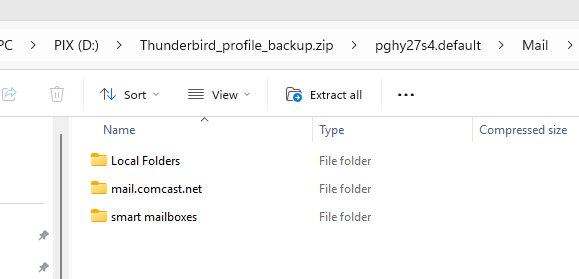
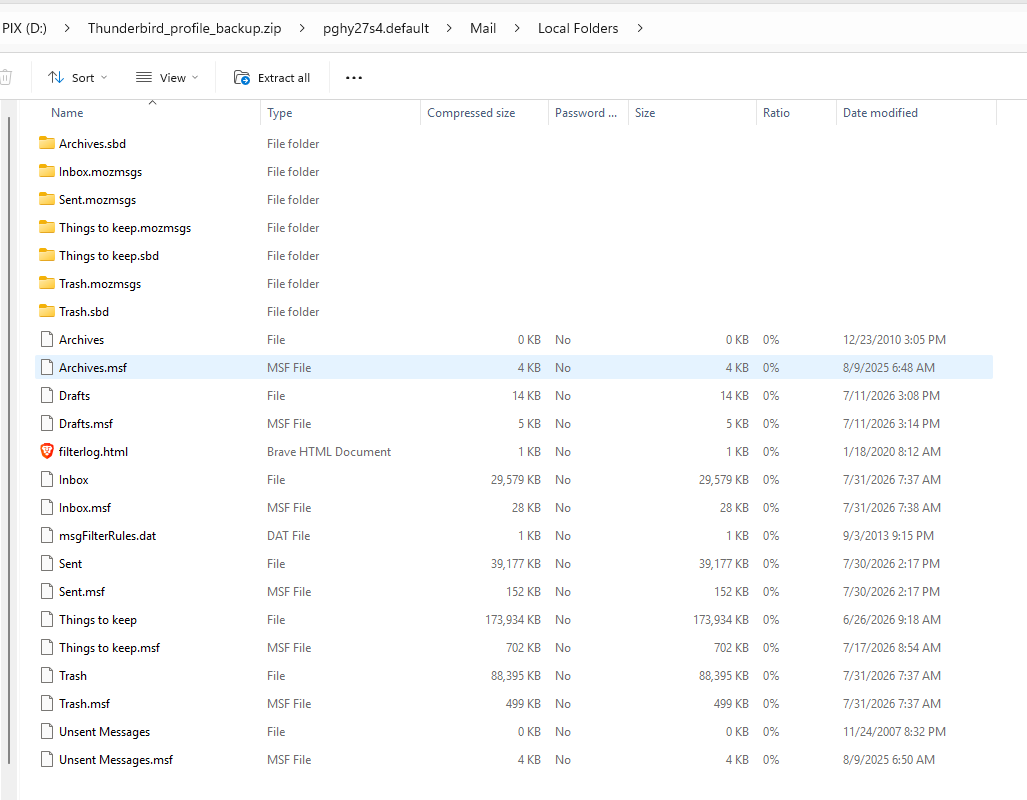
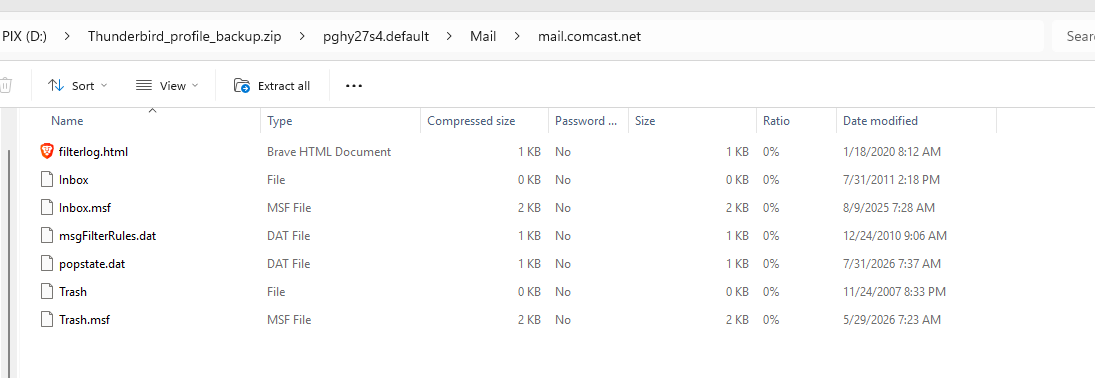
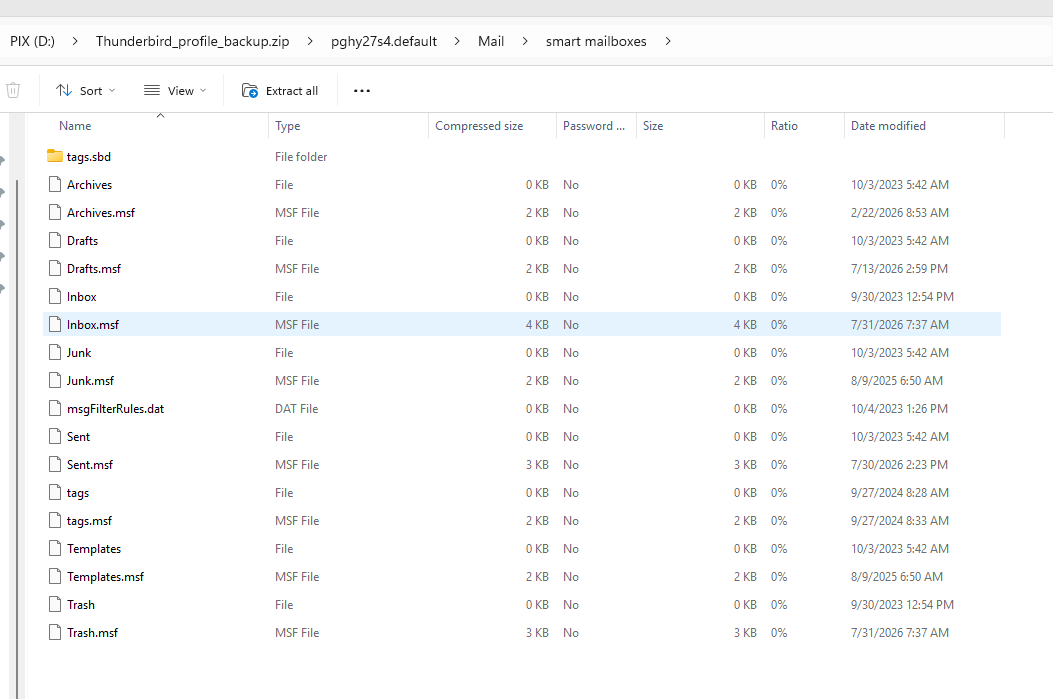
Weird. I misspoke about my account. You suggested change to IMAP. I received new messages in Thunderbird this morning and when I logged onto my email via a browser, those emails were still on the server.
I have since deleted my account in Thunderbird and recreated it as IMAP.
Still can't get Comcast to accept my password for the outgoing server.
I will research and open a new thread if needed.
Good news that you have large mbox files in the unzipped file. The worst case should be that you create a new profile in Thunderbird, set up your comcast account in it, and use the ImportExportToolsNG add-on to import the messages into local folders.
But you said that you had about thirty local folders. The only user-created mbox file in your screen image is "Things to Keep". (There also messages in inbox, drafts, sent, and trash.) Is this the profile that is supposed to have thirty local folders? Where are those folders?
People have had many issues with Comcast. You may find a solution to your outgoing server problem by searching this forum.
Thanks!
Yes, the 30 folders were contained in "Things to Keep". My mistake.
I'm also having issues locating my iTunes library on the image copy. So I will probably restore to the previous system so that I can document where it is located and then try the reinstall once again.
What sucks is that the reinstall of Windows 11 (I opted to keep my data) took almost 5 hours to complete. At least twice, that I saw, the installation program spent over an hour each time to download updates, My internet connection download speed is close to 300mbs. That doesn't make sense.
Thanks for all of your help. I've learned quite a bit about Thunderbird.
Yeah, I overlooked the Things to keep.sbd folder.
Let us know how it goes.