


Solved
Wrong calendar

When I add a calendar event, it defaults to Holidays in US. How do I change this to the calendar associated with my email address? I often forget to change the desired calendar. Also, How do I edit the Holidays calendar? Thanks BigSam
When I add a calendar event, it defaults to Holidays in US. How do I change this to the calendar associated with my email address? I often forget to change the desired calendar.
Also, How do I edit the Holidays calendar?
Thanks
BigSam

Chosen Solution
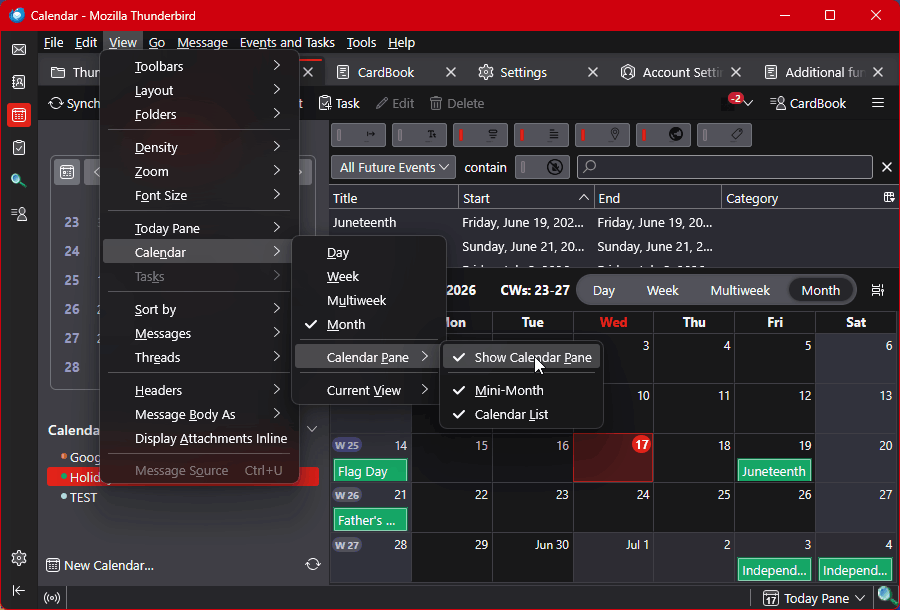
While viewing the Calendar, choose menu option <View | Calendar | Calendar Pane | Show Calendar Pane>. See attached image.
All Replies (3)
The calendars list can be reordered by drag-and-dropping. The one at the top will be the default for New Events.
Sorry, but I don't see a list of calendars. Where is it? How do I get it to display? Thanks, Sam
Chosen Solution
While viewing the Calendar, choose menu option <View | Calendar | Calendar Pane | Show Calendar Pane>. See attached image.