


Windows 10 reached EOS (end of support) on October 14, 2025. If you are on Windows 10, see this article.

Search Support

Avoid support scams. We will never ask you to call or text a phone number or share personal information. Please report suspicious activity using the “Report Abuse” option.

Learn More

Cloudlare Validation error on Attempted Login

  • No replies
  • 0 have this problem
  • Open

I have logged into TinyURL.com MANY times using Firefox. Now, I get a Cloudflare Validation Error when trying to do so (see attached screenshot/snip).

This was done in Troubleshooting mode, but is the same in standard mode, though I have no extensions enabled. I've tried turning Protection Tracking off; no luck. - We use ZoneAlarm, but the Web Secure functions are all disabled. - I have the same issue on 2 PC's, one Windows 10 and the other Windows 11, 64-bit. - I'm on FF release 150.0.2 - 64-bit, and both Windows installs are fully updated and kept that way. - I've reached out to TinyURL in hopes of resolving the issue. They suggested many of the above steps but not resolved this issue. - HOWEVER, I've found that login via Google Chrome IS seamless - no issues.

What is it with Firefox that it's having issues with the Cloudflare "Human" check? I've checked the Cloudflare site; all conditions are good, and this very setup passed the "Turnstile" check.

FF is my #1 preferred browser, so please look into this. I see that others have posted similar issues over multiple years here (but a search of support articles didn't find one . . .)

Thanks,
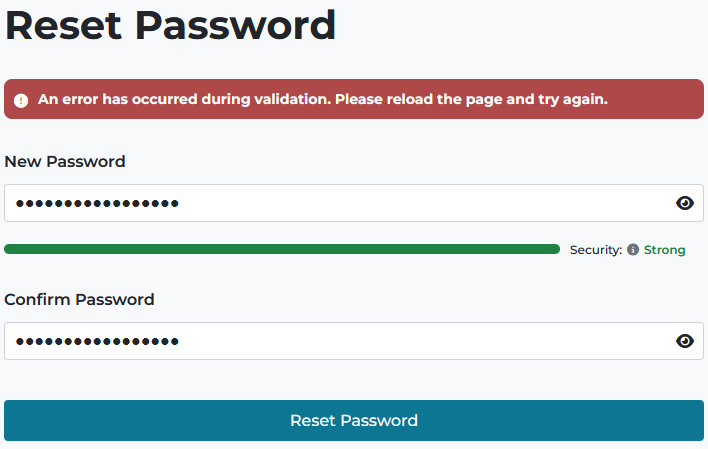
I have logged into TinyURL.com MANY times using Firefox. Now, I get a Cloudflare Validation Error when trying to do so (see attached screenshot/snip). This was done in Troubleshooting mode, but is the same in standard mode, though I have no extensions enabled. I've tried turning Protection Tracking off; no luck. - We use ZoneAlarm, but the Web Secure functions are all disabled. - I have the same issue on 2 PC's, one Windows 10 and the other Windows 11, 64-bit. - I'm on FF release 150.0.2 - 64-bit, and both Windows installs are fully updated and kept that way. - I've reached out to TinyURL in hopes of resolving the issue. They suggested many of the above steps but not resolved this issue. - HOWEVER, I've found that login via Google Chrome IS seamless - no issues. What is it with Firefox that it's having issues with the Cloudflare "Human" check? I've checked the Cloudflare site; all conditions are good, and this very setup passed the "Turnstile" check. FF is my #1 preferred browser, so please look into this. I see that others have posted similar issues over multiple years here (but a search of support articles didn't find one . . .) Thanks,
Attached screenshots

You must log in to your account to reply to posts. Please start a new question, if you do not have an account yet.