


Clean install of thunderbird but no profile found in usual location. I put in some old profiles, but still doesn't recognize them. Multiple tries.

I've used thunderbird for years. Now I can't get it back. I tried a clean uninstall/reinstall. Downloaded from the thunderbird site. Seems to install fine, but then says no profile recognized. I put some old profiles in the appdata\roaming\thunderbird\profiles in desperation, but still no luck. My clean uninstall did involve registry entries (Revo-Uninstall). So I'd like to get a clean start with Thunderbird, but it won't let me. Any suggestions greatly appreciated. I dread the idea of using another email after all these years!
All Replies (3)

Please show us a listing of the contents of both the Profiles folder (appdata\roaming\thunderbird\profiles) and the Thunderbird folder (appdata\roaming\thunderbird). Screen shots will do.
Also post the contents of your PROFILES.INI file, which is normally found in the Thunderbird folder.
I'm wondering if I should just delete all of the profiles in the profiles subfolder and let the new install create its own profile. But what I was trying to do.... maybe foolishly...was to install a new thunderbird program but retain the configuration I have on my current one.....Many thanks for your offer to help! Images added.
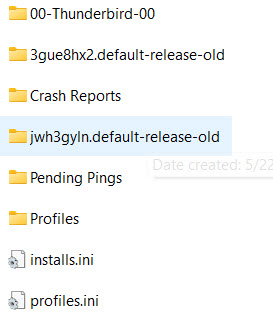
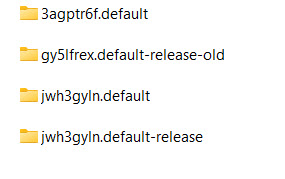
If you have the explicit profile you used, not the Thunderbird folder, but the actual profile folder, this should be easy. Your old profiles.ini file will have its name. When you open that old profile in windows file explorer, you will several files, one of which is abook.sqlite and probably an imapmail folder and a mail folder. You are getting a no profiles found message because whatever you are placing there has its own problems. Here are my suggested steps:
- delete any appdata\roaming\thunderbird folder while thunderbird isn't running
- restart thunderbird so it can create a default profile
- bypass the prompt to setup an account and click help>troubleshootinginformation
- scroll to 'profile folder' and click 'open folder'
- exit thunderbird
- you are now in the profile. delete everything
- now, copy your saved profile and paste it in here.
- restart thunderbird and it should see it.