


My sub folders have stopped being visible on my desktop, but are still visible and usable on my Android Thumderbird app.

Recently my email subfolders stopped being visible on my Thunderbird desktop. They are still visible and accessible on my Thuderbird Android app on my phone. Any suggested remedies I see call for steps that I don't seem to have in my settings. My desktop SW version shows as 148.0.1 (up to date)
Chosen solution
If they were once visible and now are not, it may be that they are unsubscribed. rightclick on the account in folder pane and select 'subscribe' and check there.
Read this answer in context 👍 0All Replies (3)
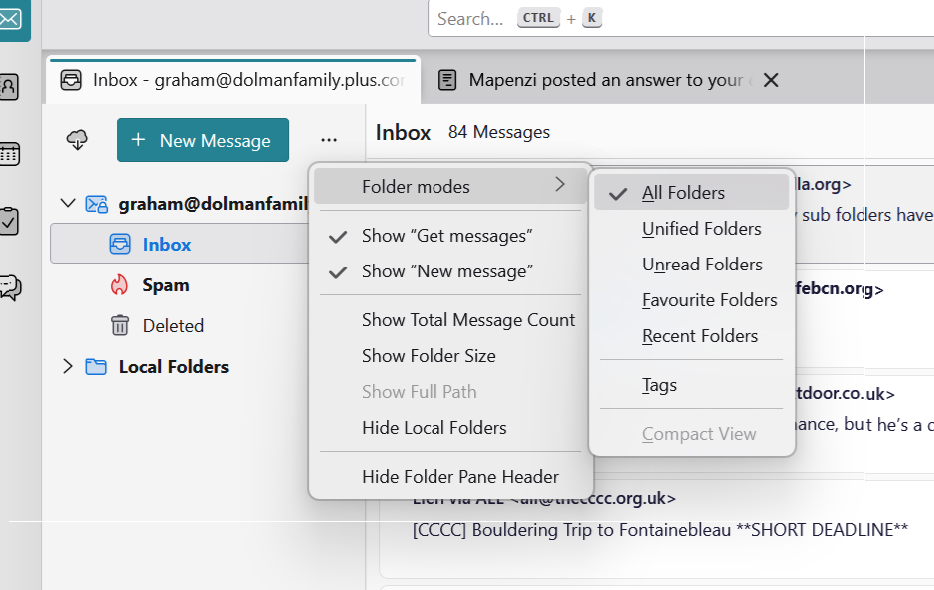
Where have you created those sub-folders? In a POP or an IMAP account or in Local Folders? In the View > Folders menu do you have selected "All Folders"?
Thanks for getting back to me. The the sub folders were created by right clicking on my inbox icon. I assume because they are visible from my android phone Thunderbird app that they are on IMAP. The screen shot below shows what I see when I try to select folder options. I don't see a "view" menu option, though.
Chosen Solution
If they were once visible and now are not, it may be that they are unsubscribed. rightclick on the account in folder pane and select 'subscribe' and check there.