


Issue With Sent Folder

I’m on Thunderbird 148.0.1 (aarch64), and having an issue each time I go to my Sent folder. What happens is this. I try to select an email I just sent minutes ago, and Thunderbird scrolls down to almost the last sent email (in my case, as I keep everything, that email could be years old).
This is only on my M1 MacBook Pro, as on my 2018 Intel Mac Mini (both systems are running Sonoma 14.8.4 I can select any recent email in my Sent folder and the selection stays.
Chosen solution
I changed the from "cards view" to "table view" as you had suggested in your email, and the problem has magically gone away. Thank you, thank you, thank you!
Read this answer in context 👍 0All Replies (15)
If the "Date " column is active Thunderbird displays the most recent message either at the top of the message list or at the bottom, according to your last choice for the "Date" column in the Sent folder. Click once on the Date column header to reverse sort order from ascending to descending or vice versa. TB will memorise your choice.
Modified by Mapenzi
The "Date " column is in fact active. But no amount of changing the settings resolves the problem, and it only on the M1 MacBook Pro, as I said above Thunderbird behaves perfectly on my 2018 Intel Mac Mini.
Homer712 said
But no amount of changing the settings resolves the problem..
Which "setting changes" do you mean?
Just an idea: R-click on this Sent folder > Properties > General > Repair Folder... Custom column sort order is saved in the *.msf (index) files in profile
I tried the R-click on this Sent folder > Properties > General > Repair Folder... didn't help.
And I need to repeat that this only happens on the M1 MacBook Pro, and not on my 2018 Intel Mac Mini.
I can't explain why this happens on one Mac and not on the other. When you switch to the Sent folder do you really see Thunderbird put the scrollbar "in the middle of nowhere" instead of moving it either to the top or the bottom of the thread pane, complying to default behaviour? To find the error I'd need a screen video capture or have to sit before your Mac and do a test.
"To find the error I'd need a screen video capture or have to sit before your Mac and do a test."
Not knowing where you live I'll select the option to send you a video. When I clicked on your name above it said something about sending a 'Private" message. If that will accept a video, I'd rather do that then posting the video here in the forum for all to see. In any event, I'll do it a bit later.
Well, I've discovered that neither the forum nor a private message will accept a video file, so you'll have to send me an email address to enable me to send you the video file I made.
This forum accepts images but no videos. I'm living in France (EU) and my email address is mapenzi at free.fr Thank you.
Chosen Solution
I changed the from "cards view" to "table view" as you had suggested in your email, and the problem has magically gone away. Thank you, thank you, thank you!
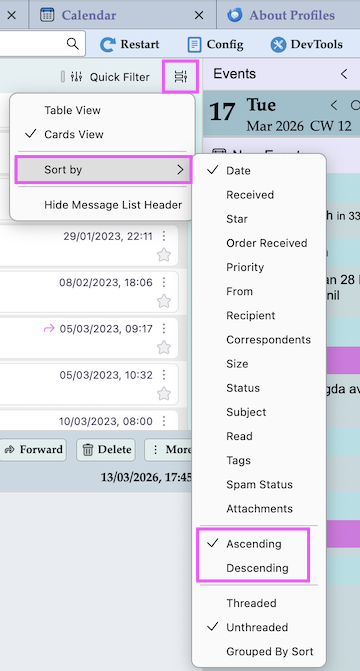
I'm glad that you solved your problem. As a matter of fact I'm embarrassed since I missed an important hint: as on old-fashioned Thunderbird user I continue to use the table view for my daily working and am not very familiar with cards view. So I hadn't noticed that even in cards view you can use the "Sort By" menu by clicking on this bizarre "Message list display options" button in the upper right corner and then choosing Sort By. This way you can easily switch between Ascending/Descending sorting for Date in cards view too.
Modified by Mapenzi
Thank you Mapenzi, I would have never come up with the solution by myself. You are in fact a Thunderbird Expert!
Mapenzi, this morning the same error showed itself in the table view, so I changed back to cards view and the error went away. At this point I'm convinced that this error is being caused by something in Thunderbird, at least in the 148.0.1 (aarch64) version.
Make a test running Thunderbird in "troubleshoot mode": press the Alt (Option) key while launching Thunderbird from its Dock icon https://support.mozilla.org/en-US/kb/troubleshoot-mode-thunderbird
Mapenzi, I'm not that technical so I'll stay away from the whole "troubleshoot mode" thing. Sorry.
Mapenzi, I'm also very fearful of having anybody have remote control of either of my Apple systems, so I'll pass on that as well.