


Unified folders aren't working

I got a new computer, and after installing Thunderbird, it took forever to get it set up with the information from my old computer. Now, the unified folders aren't working. All of my mail is going into each account's inbox. There's no option to choose anything on the unified inbox, only the same thing as the other inboxes have. Help, please!
All Replies (4)
nancyeddy said
There's no option to choose anything on the unified inbox, only the same thing as the other inboxes have.
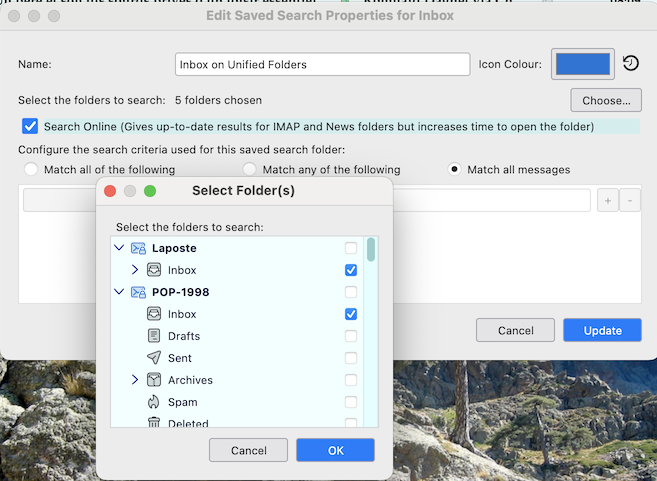
What do you want to choose for the unified Inbox? If you mean the differences in context menu options between a unified Inbox and an individual Inbox folder they are necessary since "Unified Folders" are virtual "saved search" folders. They display messages from different accounts in a mutual "unified" folder, but the messages keep being stored in their original folders. Exemple of a unified Inbox R-click > Properties options > Choose....: here you select or deselect the individual Inbox folders you want to include/exclude in the unified folder display (image)
Modified by Mapenzi
I don't have that option. Already did an uninstall and reboot. Going to reinstall later and copy the T-bird folder from one comp to the other.
I wouldn't expect the things you plan to do to help.
But you might try the following: 1. Help > troubleshooting Information 2. click show profile folder 3. close Thunderbird 4. delete the file virtualFolders.dat 5. delete the folder Mail/smart mailboxes 6. start thunderbird
the unified folders will regenerate
Modified by Wayne Mery
Will give it a shot after I reinstall - if it's not working right then. Thanks.