


Windows 10 reached EOS (end of support) on October 14, 2025. If you are on Windows 10, see this article.

Search Support

Avoid support scams. We will never ask you to call or text a phone number or share personal information. Please report suspicious activity using the “Report Abuse” option.

Learn More

IMAP folder state inconsistency / message-count fluctuation issue

  • No replies
  • 0 have this problem

Greetings all

I have been experiencing a strange issue with Thunderbird for the last three months, and it’s quite frustrating.

I use an IMAP/SMTP SSL setup (ports 993/465) with a local server that includes webmail but also supports IMAP and SMTP for email client management. Over the past three years, we never encountered any issues, but since upgrading Thunderbird, this problem has started occurring.

As you can see in the GIF, messages appear and disappear when I switch to another folder and then return. This affects not only the message counter but also the actual messages themselves. At first, I thought it might be an indexing issue, so I tried deleting the *.msf files and the global-messages-db.sqlite file within the account profile, but the result was always the same. I also increased the frequency of checking for new messages to every 10 minutes and changed the maximum number of server connections to cache from 1 to 20, but nothing changed.

No issues with webmail and with other email client.

Do you have any ideas or suggestions?
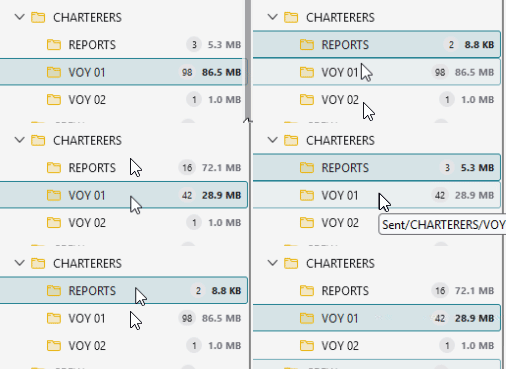
Greetings all I have been experiencing a strange issue with Thunderbird for the last three months, and it’s quite frustrating. I use an IMAP/SMTP SSL setup (ports 993/465) with a local server that includes webmail but also supports IMAP and SMTP for email client management. Over the past three years, we never encountered any issues, but since upgrading Thunderbird, this problem has started occurring. As you can see in the GIF, messages appear and disappear when I switch to another folder and then return. This affects not only the message counter but also the actual messages themselves. At first, I thought it might be an indexing issue, so I tried deleting the *.msf files and the global-messages-db.sqlite file within the account profile, but the result was always the same. I also increased the frequency of checking for new messages to every 10 minutes and changed the maximum number of server connections to cache from 1 to 20, but nothing changed. No issues with webmail and with other email client. Do you have any ideas or suggestions?
Attached screenshots

You must log in to your account to reply to posts. Please start a new question, if you do not have an account yet.