

This thread was archived.
Please ask a new question if you need help.

Solved
Archived
Need help editing personal dictionay in Thunderbird

I need help editing the personal dictionary in Thunderbird. Tonight I accidentally told it to save a misspelled word. I clicked on edit in the window, and it brought up my dictionary, but it was way longer than my screen, and I could find no scroll bar. It also would not let me move the dictionary window! Can anyone help me overcome this so I can delete the incorrect word?
Thanks!
I need help editing the personal dictionary in Thunderbird. Tonight I accidentally told it to save a misspelled word. I clicked on edit in the window, and it brought up my dictionary, but it was way longer than my screen, and I could find no scroll bar. It also would not let me move the dictionary window! Can anyone help me overcome this so I can delete the incorrect word?
Thanks!
All Replies (3)
Chosen Solution
The persdict.dat file in the profile folder can be edited with a text editor. Help/Troubleshooting Info, Profile Folder, Open Folder, close TB, edit the file.
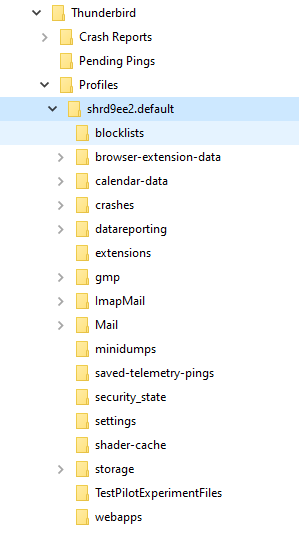
Hi sfhowes! I foll0wed your instructions, but there is no persdict.dat folder. Here is what I get after I open the file - see attached screenshot.
Hi again - I found it! Thanks so much for your help!