


Firefox refuses to enstabilsh connection
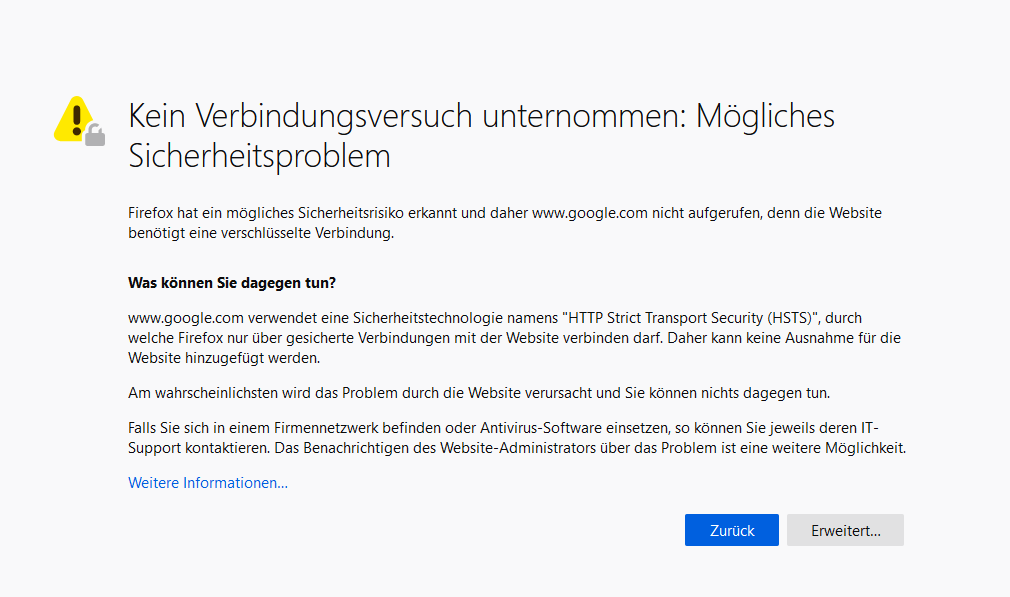
Hi, as of yesterday I'm no longer able to use firefox, since browsing doesn't work anymore. As soon as I try to load a page, a messge pops up that said that due to a possible health risk firefox doesn't even bother to connect (and of course I looked for a link that allowed be to go on) The test is geman, but I think that the basic of the message. Unfortunately there is no support whatsoever in other languages.
I think I can change the settings in opera, which, as the best browser atm, would be a real improvent to firefox, but I am not able to export the chronic as well as the bookmarks, that why I stayd with FF. But now, since FF isn't running anymore, I decided to finally improve my Browser. How do I import bookmarks,chronic and other settings form FF to Opera ?
All Replies (1)
We regularly see such issues reported with Google websites, could be caused by malware or by using a proxy/VPN.
You can check the connection settings.
- Options/Preferences -> General -> Network: Connection -> Settings
If you do not need to use a proxy to connect to internet then try to select "No Proxy" if "Use the system proxy settings" or one of the others do not work properly.
See "Firefox connection settings":