


White text on black background color schemes that are complete?

Are there any white text on black background color schemes that are complete? My search bar background color is bright white. My Unsorted Bookmarks Library window background is glaring bright white, can't see a thing in it.
I researched the issue and figured out how to change the URL address bar text and background color, using userChrome, but haven't been able to find anything on changing the Unsorted Bookmarks Library window background color or the search bar background color.
I haven't searched for the search bar background color, yet. Hopefully that one is easier to find than the Unsorted Bookmarks Library window background color setting.
Bookmarks > Unsorted Bookmarks > Library > BOOM! BRIGHT WHITE BACKGROUND
Thanks.
Using the most recent version of Firefox
Windows 8, 64 bit
Using a built-in high contrast white-on-black windows theme
選ばれた解決策
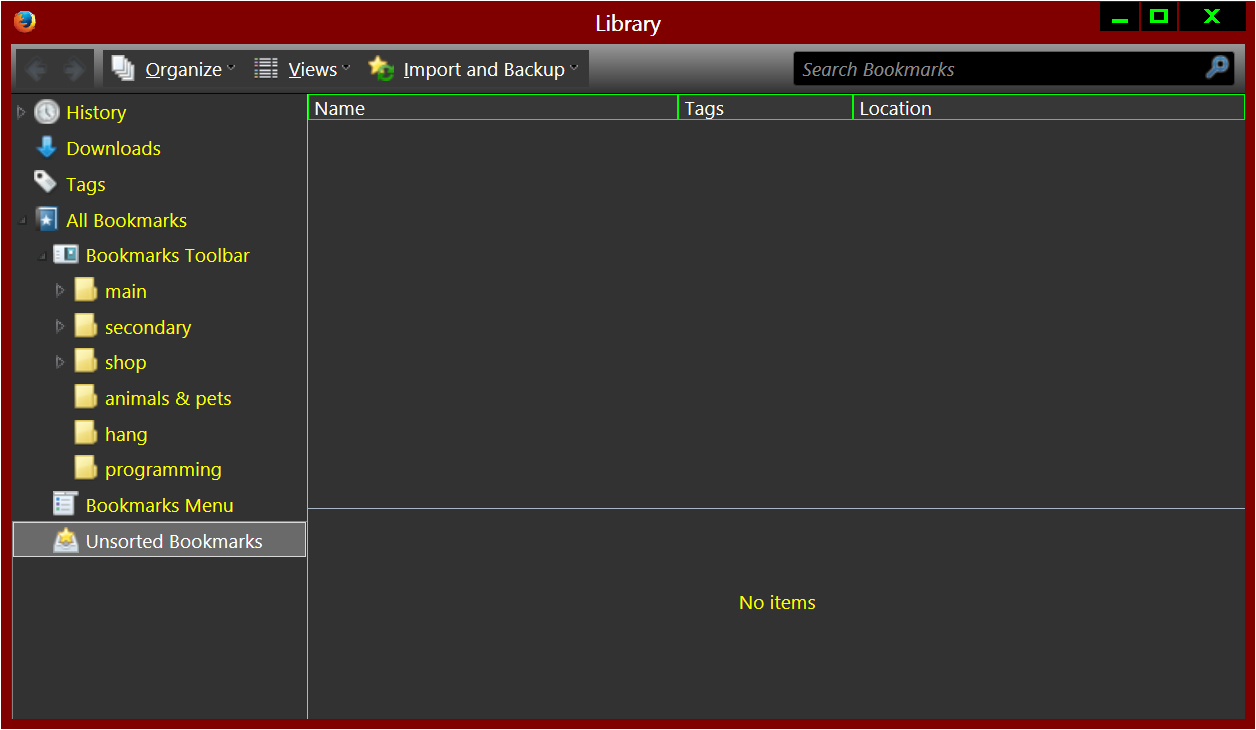
If I'm being unclear, please let me know. The main thing I would like to change is the bookmarks library window background color, since the bookmarks library is unusable as is. It's the big resizable window right here...
Bookmarks > Unsorted Bookmarks > Library
The window that shows all of your bookmarks [and history].
The background is glaring bright white, so the text (in my dark scheme) is invisible.
http://farm8.staticflickr.com/7323/11521429746_7969a16134_c.jpg

I can use userChrome if I know the identifier of the library window background color. So I'm going to try the "DOM Inspector" add-on. I guess it's supposed to tell us what the identifier is.
Thanks.
trial and error...
the IDs/code...
#itemsCountBox{background-color:rgb(50,50,50)!important;color:rgb(255,255,0)!important;}

#placeContent>treechildren{background-color:rgb(50,50,50)!important;color:rgb(255,255,0)!important;}

#editBMPanel_rows{background-color:rgb(50,50,50)!important;color:rgb(255,255,0)!important;}

#placesList>treechildren{background-color:rgb(50,50,50)!important;color:rgb(255,255,0)!important;}

#placesToolbar{background-color:rgb(50,50,50)!important;color:rgb(255,255,0)!important;}

#detailsDeck{background-color:rgb(50,50,50)!important;color:rgb(255,255,0)!important;}
experiment to your liking
this is for the find bar, thanks to (twnsnd)...
- FindToolbar,.tabbrowser-tabbox findbar{background:#1b1b1b!important;border:1px solid #121314!important;border-top:0!important;color:#aaa !important;-moz-appearance:none!important;}
Trying to edit this post... The server is showing different pictures every time I come back to this page. I have no idea what my uploaded image really is. The pictures are supposed to be "before" and "after", but I have no way to tell whether they are on the server.
この回答をすべて読む 👍 0すべての返信 (2)
Hi duhgi,
Thank you for contacting support. There is a Menu editor extension mentioned in the MozillaZine knowledge base in Menu customization. http://kb.mozillazine.org/Menu_customization
There are also some themes and add ons that may help find the item being edited:
選ばれた解決策
If I'm being unclear, please let me know. The main thing I would like to change is the bookmarks library window background color, since the bookmarks library is unusable as is. It's the big resizable window right here...
Bookmarks > Unsorted Bookmarks > Library
The window that shows all of your bookmarks [and history].
The background is glaring bright white, so the text (in my dark scheme) is invisible.
http://farm8.staticflickr.com/7323/11521429746_7969a16134_c.jpg
I can use userChrome if I know the identifier of the library window background color. So I'm going to try the "DOM Inspector" add-on. I guess it's supposed to tell us what the identifier is.
Thanks.
trial and error...
the IDs/code...
#itemsCountBox{background-color:rgb(50,50,50)!important;color:rgb(255,255,0)!important;}

#placeContent>treechildren{background-color:rgb(50,50,50)!important;color:rgb(255,255,0)!important;}

#editBMPanel_rows{background-color:rgb(50,50,50)!important;color:rgb(255,255,0)!important;}

#placesList>treechildren{background-color:rgb(50,50,50)!important;color:rgb(255,255,0)!important;}

#placesToolbar{background-color:rgb(50,50,50)!important;color:rgb(255,255,0)!important;}

#detailsDeck{background-color:rgb(50,50,50)!important;color:rgb(255,255,0)!important;}
experiment to your liking
this is for the find bar, thanks to (twnsnd)...
- FindToolbar,.tabbrowser-tabbox findbar{background:#1b1b1b!important;border:1px solid #121314!important;border-top:0!important;color:#aaa !important;-moz-appearance:none!important;}
Trying to edit this post... The server is showing different pictures every time I come back to this page. I have no idea what my uploaded image really is. The pictures are supposed to be "before" and "after", but I have no way to tell whether they are on the server.
この投稿は duhgi により に変更されました