

このスレッドはアーカイブに保管されました。
必要であれば新たに質問してください。

Solved
アーカイブに保管済み
新分頁網址的設定

原本新分頁出現是firefox的,但是突然<ASK>就變成首頁和按新分頁時的搜尋引擎,也沒辦法消掉,也不能更改每次按新分頁的網址
原本新分頁出現是firefox的,但是突然<ASK>就變成首頁和按新分頁時的搜尋引擎,也沒辦法消掉,也不能更改每次按新分頁的網址
選ばれた解決策
Hello k186411, see also if you have something related to "ask" in extensions, toolbar or anything else : Use the Add-ons Manager to remove the toolbar
thank you
すべての返信 (4)
- In the Location bar, type about:config and press Enter. The about:config "This might void your warranty!" warning page may appear.
- Click I'll be careful, I promise!, to continue to the about:config page.
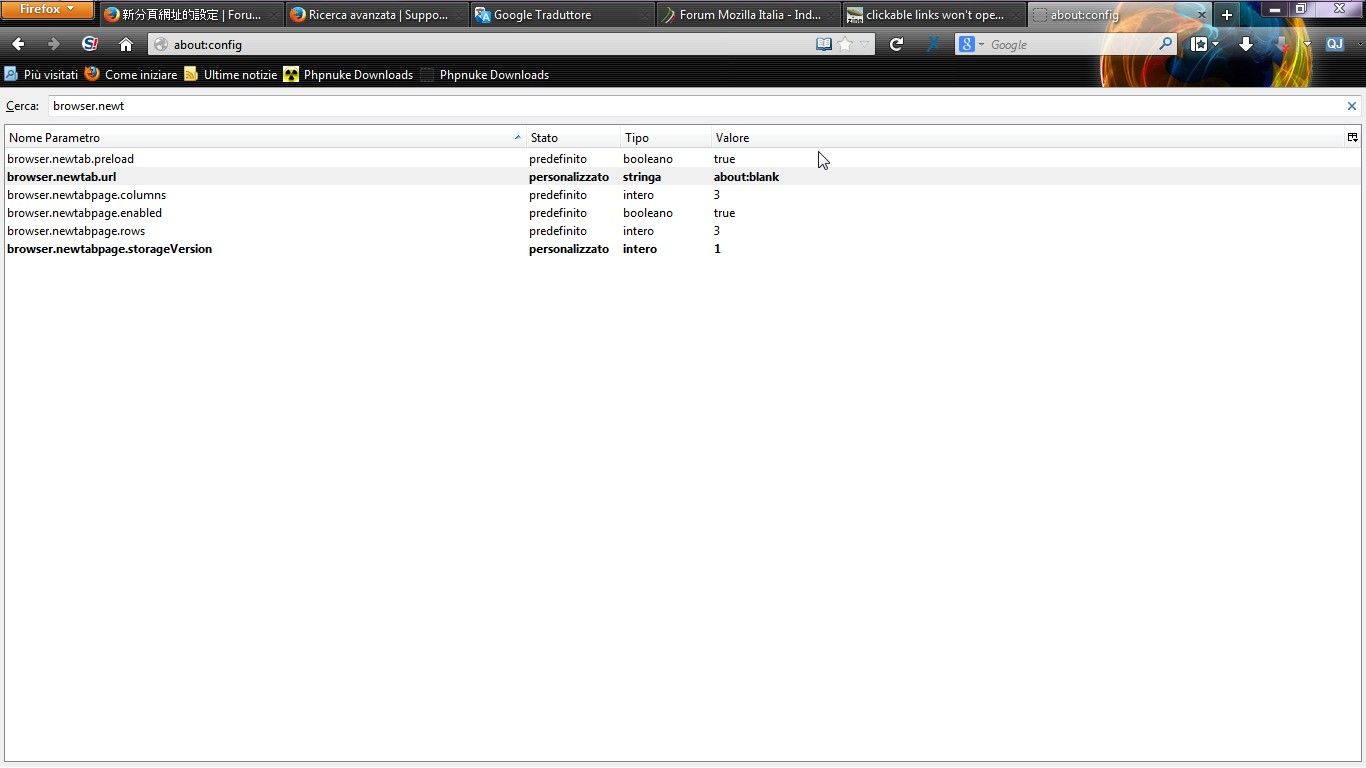
Search the string "browser.newtab.url", click twice and modify the link that you would open when you open a new tab...Solved?
可以用中文嗎?或是圖示?我找不到about:config......
See the screenshot
選ばれた解決策
Hello k186411, see also if you have something related to "ask" in extensions, toolbar or anything else : Use the Add-ons Manager to remove the toolbar
thank you