Why does IRS file from Adobe print in landscape form even though the setting is for letter orientation?

My printer setting is set to print in Letter format but whenever I pull a government from in Adobe acrobat it prints out in landscape even though the page looks like it would print in letter format. I only have this problem with documents pulled up from the Internet, not with anything else.
すべての返信 (1)
Sorry, that is really an Adobe support issue. When you open a PDF file in a Firefox window or tab, Adobe does the printing of that file, not Firefox.
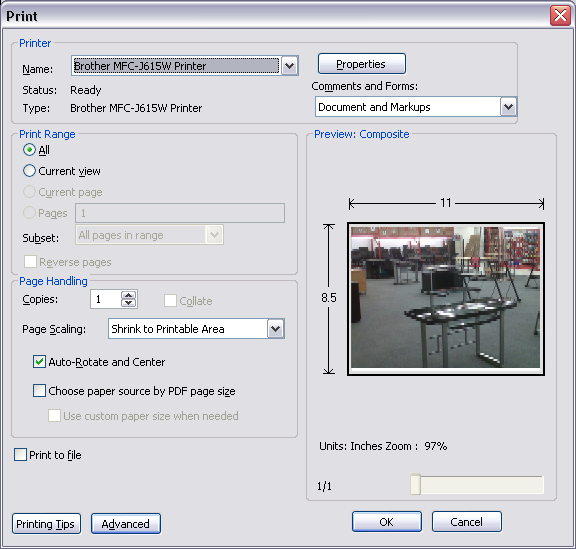
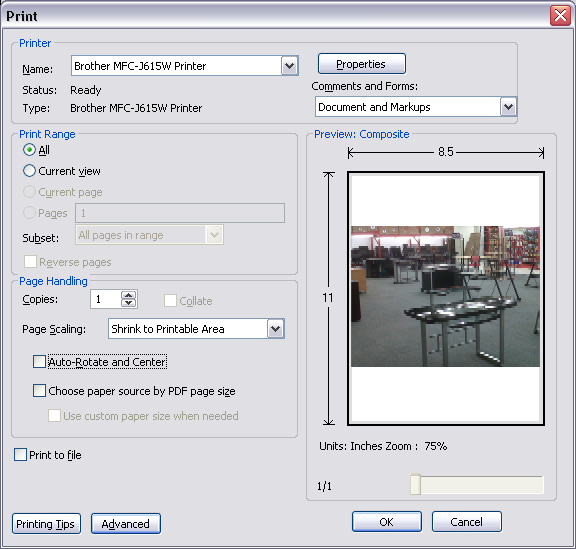
Take a look at the two screenshots I uploaded with the print dialog that Adobe uses on my WinXP system. The first shows the image as in the original PDF file in Landscape. The second shows that image in Portrait; I got that change by de-selecting Auto-rotate and Center in the Page Handling section of that print dialog window. The downside to that is, that it shrunk that image. See if that works better for you. Beyond that, Adobe didn't allow me to change the paper orientation in my printer properties by using the Properties button in that print dialog window.
Another way of handling that would be to save that file to your computer and open it directly with Adobe Reader. Then see if you have more control over Adobe's printing of that file.