


Account folder is duplicated

Somehow my account folder has duplicated itself, complete with Inbox, Drafts, Sent and Trash. Going to Settings, I can't see any difference. Both continue to be updated with new mail. How can I delete the duplicate? I see nothing in 'Account Settings' that would let me delete it.
すべての返信 (7)
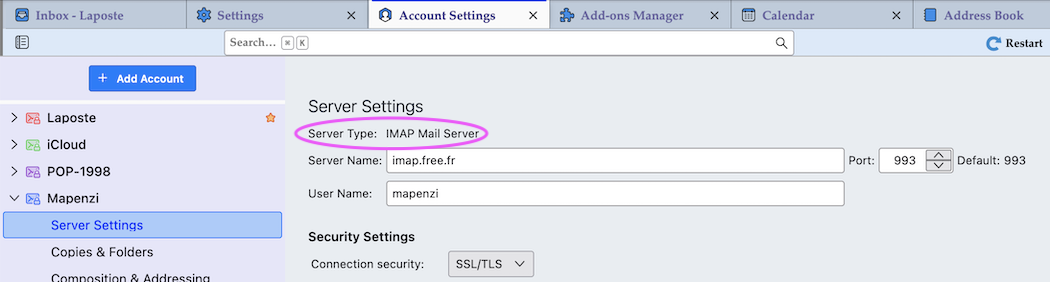
Maybe you have set up two email accounts for the same email address: once with a POP server and again with an IMAP server (or vice versa). You can find the server type in the Server Settings (image)
Nope, they're both POP3. And I didn't do this deliberately, it happened all by itself AFAICT.
I've never seen that. You sure the duplicate is an account and not another identity (alias)?
Not sure. The look like accounts, they both offer 'Account Settings' on right click. How can I check for 'identity'? Never did anything like that on purpose. Some accidental click perhaps?
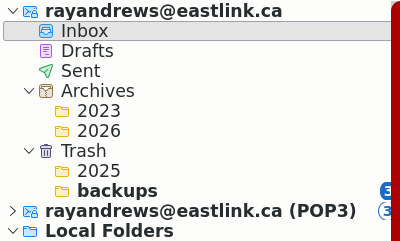
Click on the App ("Hamburger") ≡ button in the upper right corner and select "Account Settings". Do you see two accounts for an identical email address with exactly the same settings? Thunderbird refuses to set up the same account twice. Unfortunately your screen shot doesn't prove anything since it shows only the folder pane and not the account settings.
Is this better? I note the little star vs. "(POP3)" on the duplicate. But I see nothing letting me delete either one. "Account Name" shows: 'rayandrews@eastlink.ca_2' so there's clearly been some duplication at some point -- but they both show that name.
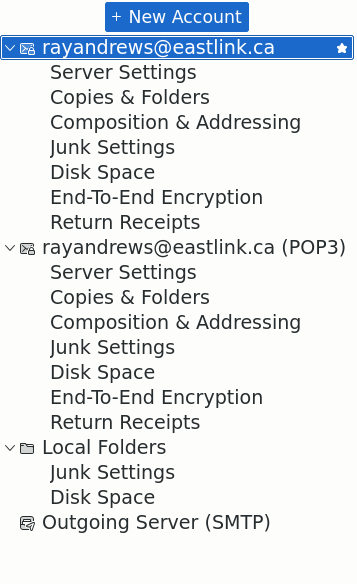
Not better, it doesn't show the server types of the accounts Have a look at my screen shot which shows how to find the "server type" POP or IMAP. Look it up for each of your two accounts.
I note the little star vs. "(POP3)" on the duplicate.
The little star indicates the "default account".
But I see nothing letting me delete either one.
I won't tell you how to delete either account unless I know that there is no danger for you to delete the wrong account. Is it so difficult to look up the server type for both accounts in the Server Settings? It would take less than a minute.