


Problem when setting up backup password

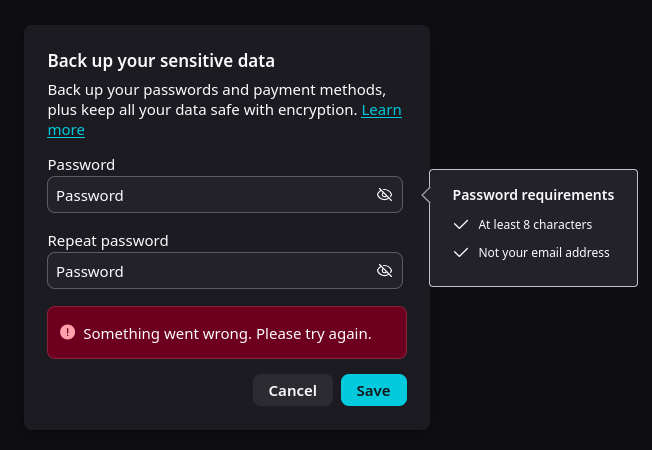
I get the most generic error when trying to set up a backup password. This happens for any kind of password I try to input, including the same one used in my Mozilla account. This happens whether the password is simple or complex, regardless of length or characters.
すべての返信 (3)
Yeah I have a feeling the dialog is missing a backup folder location prompt, which is why it's failing:(
If you open Browser Console (Ctrl + Shift + J) is there anything interesting logged once you open or submit this dialog?
There is a defined backup location - matter of fact, the regular backup is running normally as we speak.
trying with the console, I get the following error: BackupUIParent: Failed to enable encryption NS_ERROR_ABORT: User canceled OS unlock entry
exportRecoveryPhrase resource://gre/modules/OSKeyStore.sys.mjs:376
BackupUIParent.sys.mjs:306:25
receiveMessage resource:///actors/BackupUIParent.sys.mjs:306
of note, I am on Linux.

Can you file a bug, please? According to bugzil.la/1463865#c11 backups weren't supposed to interact with the keystore, but this sounds way too similar to bugzilla.mozilla.org/1755786 (the longer read is e.g. in bugzilla.mozilla.org/2006950 …)