


Importing to Thunderbird Android using QR code

I have been using Thunderbird almost 30 years.
I have Thunderbird Windows 10 desktop most recent version: 140.12.1esr (32-bit) and Android Thunderbird version 20.1
I have successfully installed a couple of gmail accounts using the QR code. Trying to install other email accounts, I only see the outbox, not any of the message folders.
Is there some trick I am missing here?
Thanks Mike
すべての返信 (2)

Seeing only outbox occurs when the account has never signed in to the server.
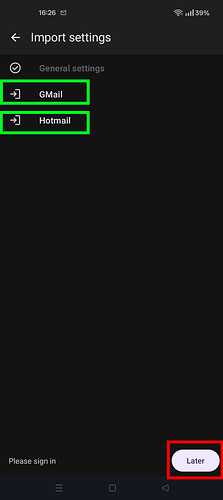
Did you press 'Later' during the account import, instead of tapping each account name and following the oauth sign-in flow. See screen shot.
To resolve, navigate to
- Settings > account name > fetching mail > incoming server
- Tap next
- Tap Sign-in with [provider] button if displayed ⋆.
⋆ Follow your mail providers oAuth 2.0 sign-in steps and grant TB permissions on your account.
この投稿は Platform34 により に変更されました
Thank you Platform 34, worked like a champ! There was a security issue, I had to "accept risk and continue". I will make it work with my other accounts as well.