


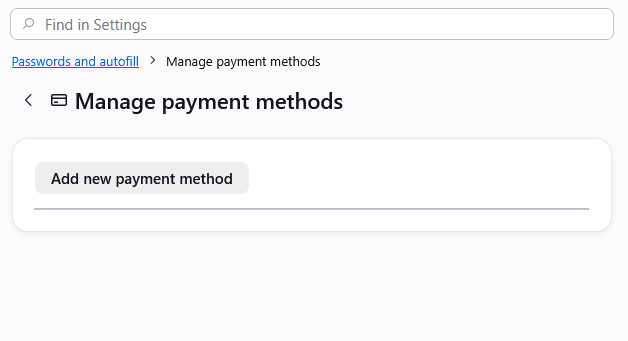
Manage payment methods list missing

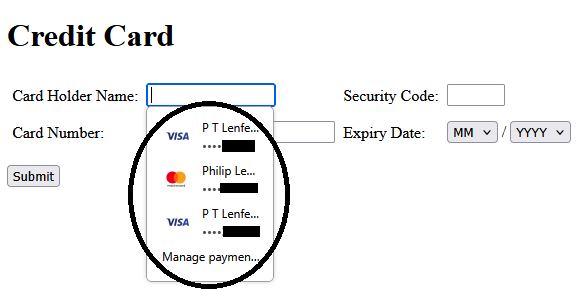
I have several saved cards in 152.0.1 (64-bit). When on a payment site the drop-down list shows up as expected, so the extensions.formautofill.creditCards.supportedCountries is correct and working (GB). Also address filling still works, as does saved passwords,
However if I try to "Manage payment methods" the resulting list in "about:preferences#managePayments" is blank. (see image)
I have tried toggling on and off "save & autofill" and restarting, but nothing helps.
Adding a new card works, and the new card appears in the drop-down list on a payment form, but still nothing appears to edit or remove in the settings. How an I edit this list?
PS: I have disabled ALL extensions.
この投稿は phil79 により に変更されました
選ばれた解決策
Thanks for the pointers, everyone, I have found a rogue/fragmented entry in my autofill-profiles.json which has:
"cc-given-name":"","cc-additional-name":"","cc-family-name":"","cc-exp":"",
If I edit the file manually, and fill in the fields to:
"cc-given-name":"Tim","cc-additional-name":"","cc-family-name":"Cucumber","cc-exp":"2100-01"
then the list in "manage payment methods" populates as expected, including the broken fragment.
So, until the uncaught error bug is fixed, the solution is to edit your autofill-profiles.json file to fill in the missing "cc-exp" value, whereupon you can edit the list normally in "manage payment methods" and fix or delete the broken entry.
Fixed!!!
すべての返信 (6)
When you restart to Use Troubleshoot Mode in Firefox is it still empty?
If you create a separate new profile to test this, and add any card there, is that visible in the list of the new profile settings?

I have the same issue, even after starting Firefox in Troubleshoot Mode. So apparently it's not related to browser extensions.
Would it be possible that you have previously saved a card without any expiration date?
It doesn't work in troubleshoot mode, but DOES if I create a new profile. All my cards have an expiration year and month, so it doesn't seem to be that.
As soon as I go into "settings" this appears inthe console:
Uncaught (in promise) TypeError: can't access property "replace", record['cc-exp'] is undefined
   items resource://autofill/FormAutofillPreferences.sys.mjs:133
   makePaymentsListItems resource://autofill/FormAutofillPreferences.sys.mjs:125
FormAutofillPreferences.sys.mjs:133:15
Thanks Phil, this is helpful! It's the exact bug that's being tracked, but it's a little discomforting to see it happening when the actual entries have their expiry set:(
I don't want to be a bother, but would you be willing to double check for me that if you try autofilling a sample form, it produces the month/year correctly there? If you open https://mozilla.github.io/form-fill-examples/ there's several variants in the top "Forms" section — if you click through the links, some will have credit card fields to test. This is just a dead form that will not pay for anything or send the data anywhere;) it's only for Mozilla testing to see how different types of forms handle the autofill input — if you try autofilling a few of these from your stored credentials — do you see the expiry really provided there? Thanks!!
選ばれた解決策
Thanks for the pointers, everyone, I have found a rogue/fragmented entry in my autofill-profiles.json which has:
"cc-given-name":"","cc-additional-name":"","cc-family-name":"","cc-exp":"",
If I edit the file manually, and fill in the fields to:
"cc-given-name":"Tim","cc-additional-name":"","cc-family-name":"Cucumber","cc-exp":"2100-01"
then the list in "manage payment methods" populates as expected, including the broken fragment.
So, until the uncaught error bug is fixed, the solution is to edit your autofill-profiles.json file to fill in the missing "cc-exp" value, whereupon you can edit the list normally in "manage payment methods" and fix or delete the broken entry.
Fixed!!!