ChromeOS and firefox

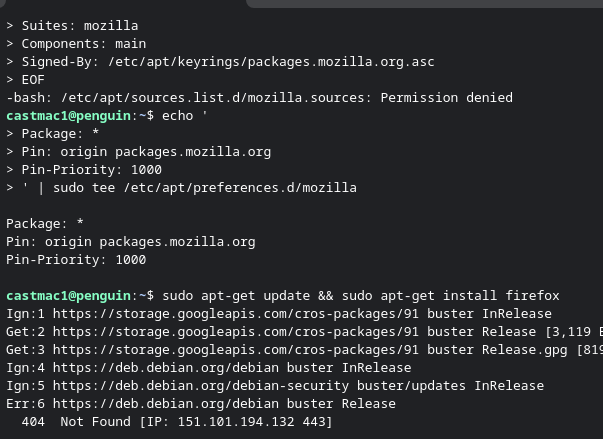
I am trying to follow the guide linked to install Firefox on an older Chromebook. It looks like the device should be supported, as running the command cat /etc/os-release returns that it is version 10. When I get to step 4 and try and run that I get a permission denied error and later steps do not work.
I did try the Google play option on the Chromebook, it says the device is not supported.
すべての返信 (2)
Hi,
Step 4 just creates a text file. If you get a permission denied error, try selecting a more privileged user or adjust directory permissions. Either way, this error shouldn't be related to Firefox.
When I copy and paste step 4 is when I get the error. If I manually type it all in without adding newlines and hit enter I get a ">" "cat <<EOF > /etc/apt/sources.list.d/mozilla.sources Types: deb URIs: https://packages.mozilla.org/apt Suites: mozilla Components: main Signed-By: /etc/apt/keyrings/packages.mozilla.org.asc EOF "
If I try and skip to step 6 it also gives me a bunch of 404. It looks like only a terminal is installed, so I do not know how to translate the lines in step 4 to make it into the file.