Firefox does not work on my system now! Fubnctionality is not on the list below, but that is my problem.

My computer glitched today. Before that I could bring up Firefox and all pages would restore.
Now Firefox comes up and shows one page like a new page. One tab and no other pages appear I had several open when the incident occurred.
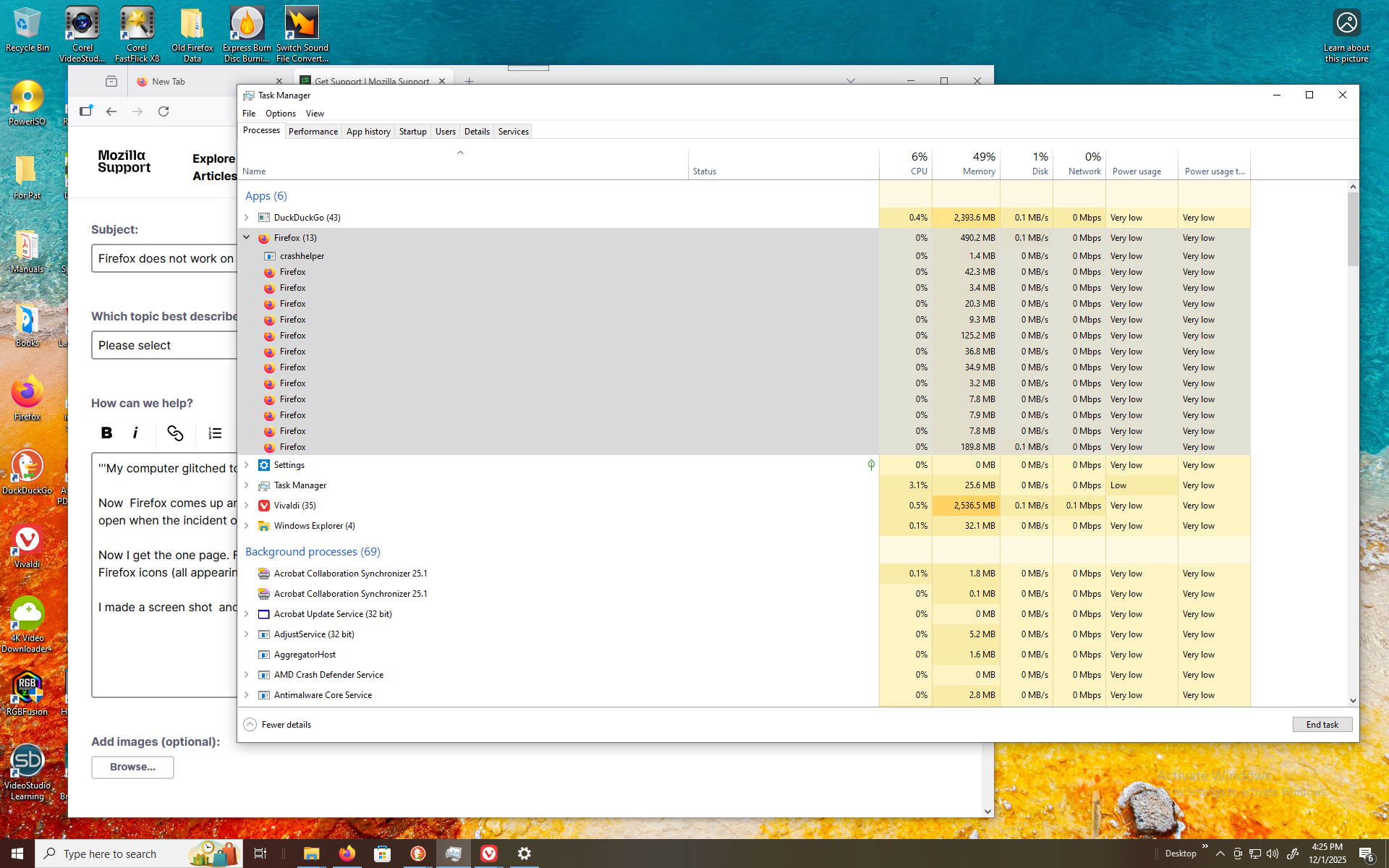
Now I get the one page. From the Task Manager window I see the one page and "crashhelper" followed by several Firefox icons (all appearing to be using memory) but none of them are displaying any pages on my display.
I made a screen shot and enclosed below
My question is about lack of functionality (Topic) but it is not listed in the selections above!
I selected Accessibility because I cannot access any of the tasks shown below the "crashhelper" because none of these pages are displyed
'''My computer glitched today. Before that I could bring up Firefox and all pages would restore.
Now Firefox comes up and shows one page like a new page. One tab and no other pages appear I had several open when the incident occurred.'''
Now I get the one page. From the Task Manager window I see the one page and "crashhelper" followed by several Firefox icons (all appearing to be using memory) but none of them are displaying any pages on my display.
I made a screen shot and enclosed below
My question is about lack of functionality (Topic) but it is not listed in the selections above!
I selected Accessibility because I cannot access any of the tasks shown below the "crashhelper" because none of these pages are displyed