


Windows 10 reached EOS (end of support) on October 14, 2025. If you are on Windows 10, see this article.

Mozilla サポートの検索

サポート詐欺に注意してください。 私たちはあなたに通話やショートメッセージの送信、個人情報の共有を求めることはありません。疑わしい行為を見つけたら「迷惑行為を報告」からご報告ください。

詳しく学ぶ

このスレッドはアーカイブに保管されました。 必要であれば新たに質問してください。

Wrong favicon on Bookmark (Toolbar)

  • 1 件の返信
  • 0 人がこの問題に困っています
  • 139 回表示
  • 最後の返信者: medsum
  • アーカイブに保管済み

I visited the following site: Broker I can see their favicon in the tab. I bookmarked it to the Bookmark Toolbar, but the favicon is not the same (See image).

I did some search on this in google but nothing helped (refresh it, delete the favicon sql file, devtools chrome enabled, etc). I thought that firefox will honor the absolute path in the website. The following code is from the web site (I used the developer tools to inspect it).

<link id="dynamic-favicon" rel="shortcut icon" href="https://content.client.bnc.ca/content/dam/orion/favicon.ico">

If I edit that line to remove everything before the favicon.ico word, I get the incorrect icon.

This is not an issue in other browsers, but I only use Firefox at home.

How can I solve this? Hopefully without using an extension. Thanks
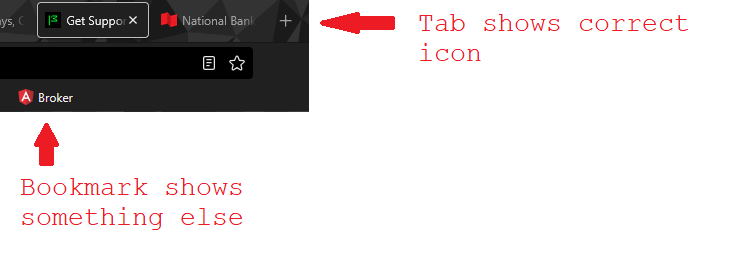
I visited the following site: [https://client.bnc.ca/nbdb/login Broker] I can see their favicon in the tab. I bookmarked it to the Bookmark Toolbar, but the favicon is not the same (See image). I did some search on this in google but nothing helped (refresh it, delete the favicon sql file, devtools chrome enabled, etc). I thought that firefox will honor the absolute path in the website. The following code is from the web site (I used the developer tools to inspect it). <link id="dynamic-favicon" rel="shortcut icon" href="https://content.client.bnc.ca/content/dam/orion/favicon.ico"> If I edit that line to remove everything before the favicon.ico word, I get the incorrect icon. This is not an issue in other browsers, but I only use Firefox at home. How can I solve this? Hopefully without using an extension. Thanks
添付されたスクリーンショット

すべての返信 (1)

Is there a way to bump this to firefox people? A few views but no solution yet.