


Choppy video
playing video on YouTube is sometimes choppy
Most of the videos I watch on Youtube play normally, without any problems, but some play choppy, as if they lag, this is very rare on YouTube, for example, a couple of days ago I opened a video, it's choppy, and now I opened it, it's going fine, when I open a private window and go to a very well-known site, all videos without exception lag
すべての返信 (3)
You have provided no examples of the issue. Can we get links to example videos? What OS? What Desktop? X11 or Wayland? Are you on WiFi or plugged in? Run ffmpeg -version to see what versions you have installed. see screenshot Did you try Firefox in Safe Mode? https://support.mozilla.org/en-US/kb/diagnose-firefox-issues-using-troubleshoot-mode#search104
Can you provide similar info about your computer. see info below
Operating System: openSUSE Tumbleweed 20230818 KDE Plasma Version: 5.27.7 KDE Frameworks Version: 5.108.0 Qt Version: 5.15.10 Kernel Version: 6.4.9-1-default (64-bit) Graphics Platform: X11 Processors: 16 × AMD Ryzen 7 5825U with Radeon Graphics Memory: 62.1 GiB of RAM Graphics Processor: AMD Radeon Graphics Manufacturer: HP Product Name: HP ProBook 455 15.6 inch G9 Notebook PC
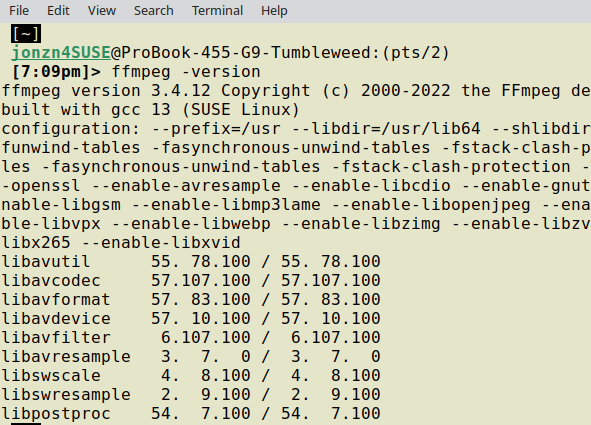
I give information, i press the button and think that i get that information, i hope this information in screenshot will help u, and i give url to google drive, example of lagging video (https://drive.google.com/file/d/1XuQ4TtObtj1nF7ojwqkZCOjPvMnK6ogV/view?usp=drive_link) And im on wifi

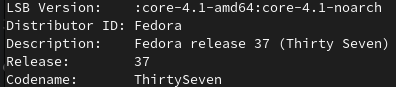
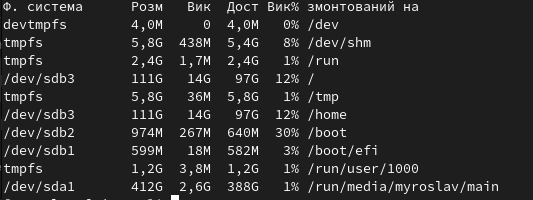

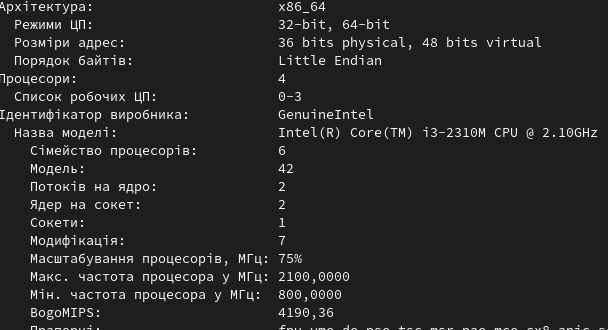
Add the RPM Fusion repo then:
sudo dnf install ffmpeg
If you are using flatpak:
flatpak install org.freedesktop.Platform.ffmpeg-full
flatpak install org.freedesktop.Platform.VAAPI.Intel