


I can't connect my server to Thunderbird

Hello,
I have a server and trying running 'POSTFIX' mail server, and I want to connect 'Thunderbird mail' to it.
On the server side, the following ports are open: 143 ALLOW Anywhere 466 ALLOW Anywhere Postfix ALLOW Anywhere
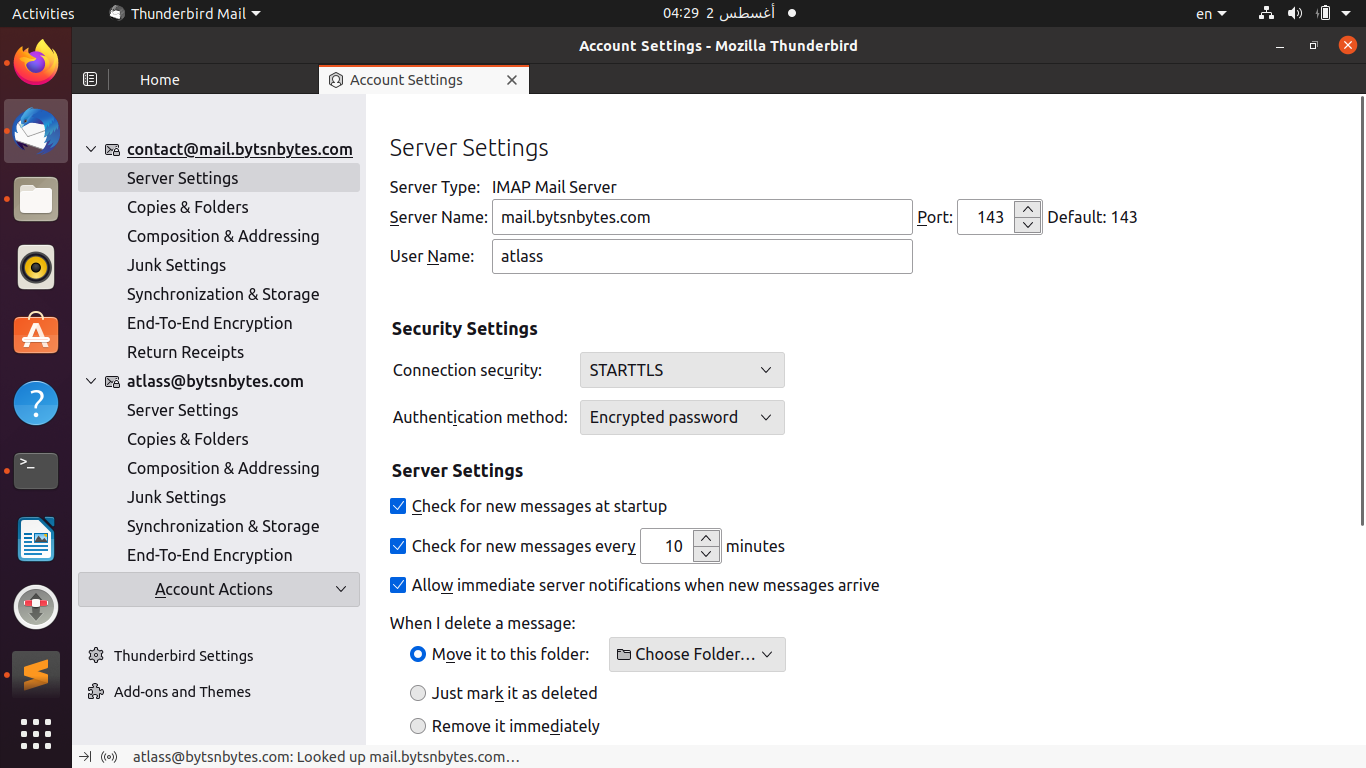
So I set Thunderbird mail to connect to these ports:
-Incoming: port 143 (screenshot 1) -Outgoing: port 465 (screenshot 2)
but the connection isn't successful, when I want to send mail this is the error shown:
======================
Sending of the message failed. The message could not be sent because connecting to Outgoing server (SMTP) bytsnbytes.com failed. The server may be unavailable or is refusing SMTP connections. Please verify that your Outgoing server (SMTP) settings are correct and try again.
======================
When I want to get messages, it tells me connection is refused.
what is the problem and how to fix it? -Regards
Website: https://www.bytsnbytes.com

すべての返信 (1)
DNS has issues https://intodns.com/bytsnbytes.com
I tried testing the SSL for the server as you have selected STARTTLS, but it failed, suggesting the port may not be open. https://www.immuniweb.com/ssl/bytsnbytes.com/Reoycxa0/
Port 143 is generally a port with no connection security and the various security and encryption require correct certificates. A common issue is certificates are installed for Apache web server, but not for the dovecote mail server.