


Supernova and attachment drag and drop?

Hello: I don't know where exactly to post this, so sysadmin, ok to move...Just migrated to supernova (115). W11p stable laptop. Only did the "upgrade" of the t-bird (so profile has remained the same).Tried to drag & drop a file as attachment, in a draft in edit mode, as in v102, but can't . Is there something I don't know here? If so, pls add info. Using the "attach" under file menu, fortunately does work, but a lot slower & haven't tried multiple drag & drop. The file is small (19 KB), & pdf, so should not be problem. Tx.
選ばれた解決策
Hi Matt, tx for 2nd reply. The prob seems to have "gone away" betw yesterday (22july23) and today. I don't recall restarting t-bird then, but prob did so. I did not completely reboot laptop. But on booting up (laptop) today, and starting to disable the few extensions I use, I saw no prob. showing the "add attachment" pane for drag & drop (which worked). I enabled the 2 extensions, and drag & drop still worked. I exited t-bird & restarted, & drag & drop still worked. Maybe a bored AI bot could have found a temp code error in w11 file mgr somewhere that disappeared on laptop shutdown, but no human would be bothered, I think.
I will call the issue "solved" here, tomorrow or asap after that, fwiw.この回答をすべて読む 👍 0
すべての返信 (4)
Do you see an overlay like this when you drag your file
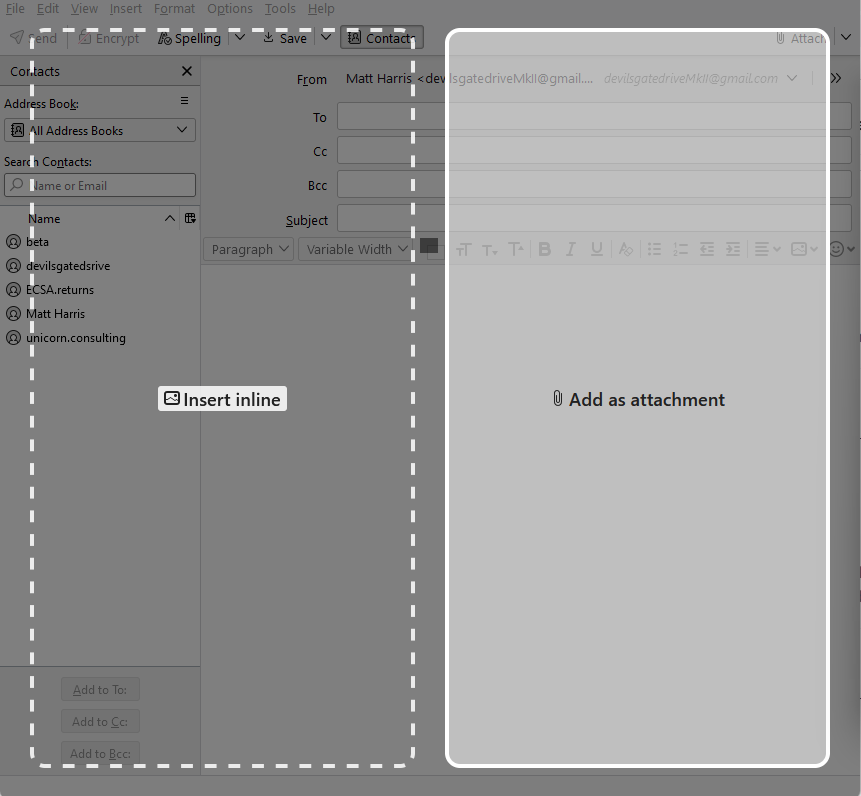
Tx, Matt. Exactly "No." That image (btw, that does not come thru to t-bird (115; that's what's active) ) is what was so useful in prior versions. That is, again, the "panes" allowed for file drag & drop into msg pane or as attachment. Not yet here that I found in 115, is there a setting I should look for & activate? Tx.
I think we need to be looking for something like an add-on going off the rails then. I did that image using the 117.0a1 (2023-07-21) (64-bit) build.
So it works in 102, and 117 so I don't think it will be missing from 115. Even if I don't have it installed to actually look.
Try restarting Thunderbird from the help menu in troubleshoot mode and continue when prompted. Does that change anything?
選ばれた解決策
Hi Matt, tx for 2nd reply. The prob seems to have "gone away" betw yesterday (22july23) and today. I don't recall restarting t-bird then, but prob did so. I did not completely reboot laptop. But on booting up (laptop) today, and starting to disable the few extensions I use, I saw no prob. showing the "add attachment" pane for drag & drop (which worked). I enabled the 2 extensions, and drag & drop still worked. I exited t-bird & restarted, & drag & drop still worked. Maybe a bored AI bot could have found a temp code error in w11 file mgr somewhere that disappeared on laptop shutdown, but no human would be bothered, I think.
I will call the issue "solved" here, tomorrow or asap after that, fwiw.