


Unable to add account to Thunderbird Mail Client - Desktop - Windows 11

Hello
I'm having an issue adding a new email account to Thunderbird.
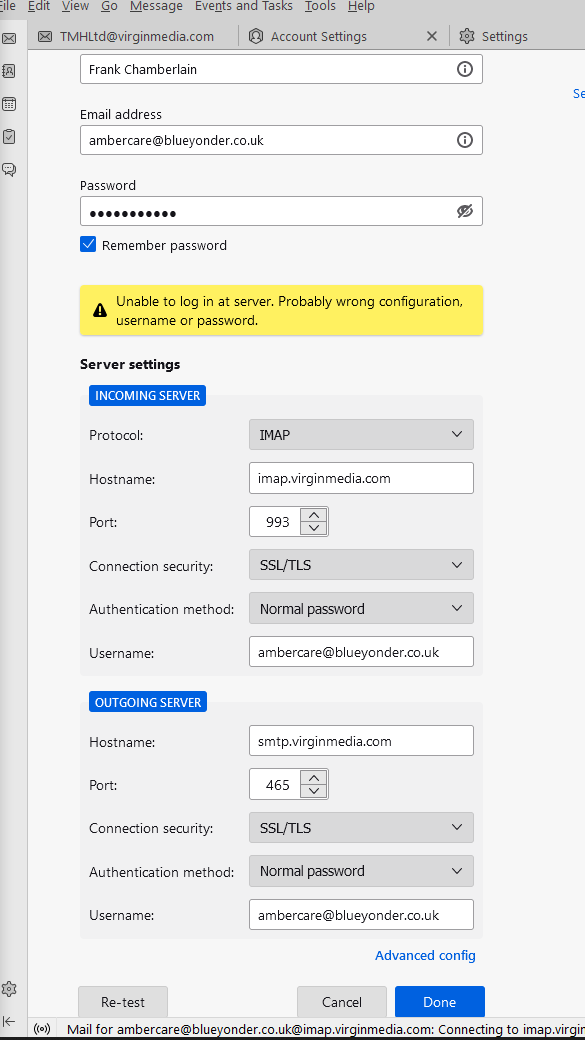
I have checked all server settings, and they match the settings provided by the email provider.
It keeps coming up with an error stating that the password is incorrect. However, this is not correct, as I've confirmed that this is the correct password for this account through their web app.
I have attached a screenshot of the server settings I have inputted. The password has been checked to ensure it is correct by unhiding the asterisks.
Here is the link for the settings provided to me by the email provider:
https://www.virginmedia.com/help/broadband/manage-email-account
Could you please let me know how to alleviate this issue and add the account to my email client.
Kind Regards, Frank Chamberlain
すべての返信 (1)
Are you applying an app password, instead of the regular account password, as required in the instructions in the link you posted?
"If you want to access your Virgin Media emails from an app, you’ll need to create a separate app password through Account settings on My Virgin Media.
To get the password, follow these steps:
Sign in to My Virgin Media a. Go to Account settings, then Account details b. Tap Manage next to Manage your Virgin Media Mail app password under Virgin Media Mail c. Then, under Virgin Media Mail app password tap Generate new App password and follow the instructions."