


Firefox fails to show Arabic characters

Hi,
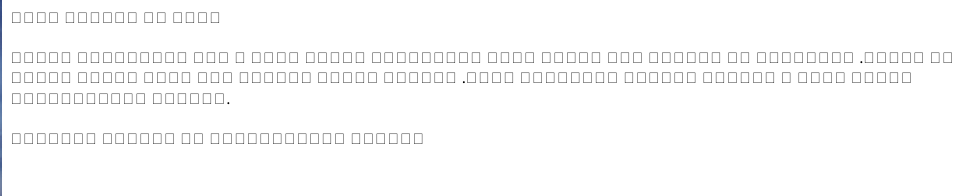
As the attached screenshot shows, my browser fails to correctly show Arabic characters in textboxes. Sometime, the same problem happens when loading a page too. I tested it with Arabic, Persian and Kurdish keyboards and still get the same problem.
My Firefox version is 113.02 (64-bit). I use an Apple M1 Pro (Ventura 13.2.1).
This problem exists since early 2023.
すべての返信 (2)
This could be a problem with the font that is used that doesn't have glyphs for those Arabic characters.
You can right-click and select "Inspect" to open the built-in Inspector with this element selected.
- https://firefox-source-docs.mozilla.org/devtools-user/page_inspector/how_to/open_the_inspector/
- https://firefox-source-docs.mozilla.org/devtools-user/page_inspector/how_to/examine_and_edit_html/
You can check in the Rules tab in the right panel in the Inspector what font-family is used for selected text. You can check in the Fonts tab in the right panel in the Inspector what font is actually used because Firefox might be using a different font than specified by the website.
Thanks for your help.
I figured out what that problem is: the extension AdBlocker for YouTube! I disabled it and everything works normally.