


Dropdown list text color

I'm currently running Firefox v 112.0.2 on Linux. I've had a theme installed for a while now that I really enjoy. It's a minimalist theme I found on github and then I topped it off with some colors that suite my desktop theme.
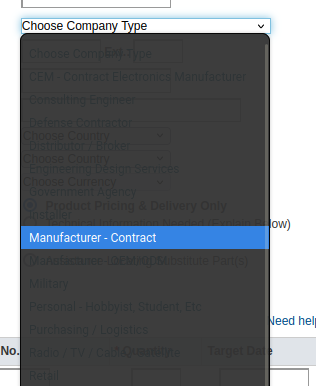
The ONLY issue I am having is with the dropdown menus. I can't see any of the list items and I cannot for the life of me figure out where to modify these colors. Searching has only gotten me more confused.
Photo is attached. I'm hoping that changing the text color here is an easy fix. The colors are all fine in other dropdown-ish menus, like bookmark folders for example.
Thanks in advance for any advice.
すべての返信 (1)
選ばれた解決策
I went digging through all the CSS files for my theme. In the parts.css file I found
menuitem, menupopup menu { -moz-appearance: none !important; padding: 4px 8px !important; border: none !important; box-shadow: none !important; color: #ebdbb2;}
Added the color line and we're good to go!