


Windows 10 reached EOS (end of support) on October 14, 2025. If you are on Windows 10, see this article.

Mozilla サポートの検索

サポート詐欺に注意してください。 私たちはあなたに通話やショートメッセージの送信、個人情報の共有を求めることはありません。疑わしい行為を見つけたら「迷惑行為を報告」からご報告ください。

詳しく学ぶ
このスレッドはアーカイブに保管されました。 必要であれば新たに質問してください。
アーカイブに保管済み

Quantities in inbox do not match what is displayed

wayne69

How do I change the display of the number of emails in the folder to just the ones unread? If I double-click on the folder it displays what I want, but I want it to stay displaying the unread number only. I need this so at a quick glance I can tell if new emails are in those Inboxes.

See the mailbox shows 194 (194 what?) doesn't allow me to determine that I have 1 or 2 new emails that had come in so I have to open up the mailbox each time to verify if any new emails had arrived. Also, there are only 27 emails in that mailbox so why is there a discrepancy between the 194 listed, the 27 that are actually there, and the 7 that are unread?
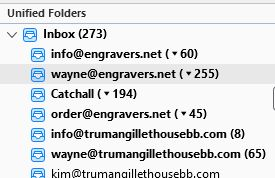
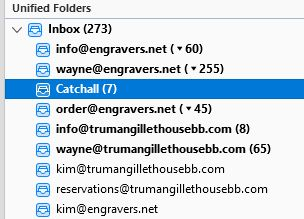
How do I change the display of the number of emails in the folder to just the ones unread? If I double-click on the folder it displays what I want, but I want it to stay displaying the unread number only. I need this so at a quick glance I can tell if new emails are in those Inboxes. See the mailbox shows 194 (194 what?) doesn't allow me to determine that I have 1 or 2 new emails that had come in so I have to open up the mailbox each time to verify if any new emails had arrived. Also, there are only 27 emails in that mailbox so why is there a discrepancy between the 194 listed, the 27 that are actually there, and the 7 that are unread?
添付されたスクリーンショット

すべての返信 (1)

Is this a question about Thunderbird or about Firefox ?

If the question is about Thunderbird then we can move the question thread to Thunderbird Support.