


Autofill not working after last update

Autofill for payment and address information has stopped working. The option to choose one will come up, but when you click it, nothing fills in. Password autofill has been working, though.
すべての返信 (6)
Hi, as not sure which version of Firefox you are currently using. Click on the following link to see if you are facing the same problem, if yes then Firefox does not provide Auto Fill feature and as of Firefox 4.0 doesn't save credit card numbers for "auto complete". Link: https://support.mozilla.org/en-US/questions/847570
If it's not the same problem, then try clicking on the following two links, you can try to update your address and credit card information and then try to fill it automatically. Hope this helps you. Link for fill in address : https://support.mozilla.org/en-US/kb/automatically-fill-your-address-web-forms Link for fill in credit card data : https://support.mozilla.org/en-US/kb/credit-card-autofill
Have a good day.
Version 101.0.1 (64-bit), sorry I should have included that to begin with. I don't have a Google Toolbar installed. I do have autofill enabled and have double-checked all the saved information. Firefox does have an autofill feature, it's right there in the settings to enable or disable and it was working perfectly fine before the update on May 31st, so I'm not sure what you mean that it doesn't have that feature.
Thank you for taking the time to respond.

Hello jayneeyoung91,
This seems to be a reoccurring issue as I had answered a similar question recently.
For the payment information autofill issue, you can try navigating to the "Privacy and Security" panel in your Firefox's Settings page, scrolling down to the "Forms and Autofill" section, clicking the "Saved Credit Cards" button, and clicking the "Edit" button for each of your credit cards.
From there, check if the credit card numbers are blank and then fill in the card numbers if they are blank.
Note: Do click the "Edit" button even if it appears that the last 4 digits of the credit card are being shown.
Repeat the above process for your address information by clicking the "Saved Addresses" button at the "Forms and Autofill" section, and clicking the "Edit" button for each of your addresses.
Note: Do click the "Edit" button even if it appears that the address details are being shown.
Kindly mark this answer as the solution(solved) if it managed to help you! If it didn't kindly report back so I can help!
This did not solve my problem, but thank you for the help and response.
There's only two settings options. And I am not posting my saved cc and address information.
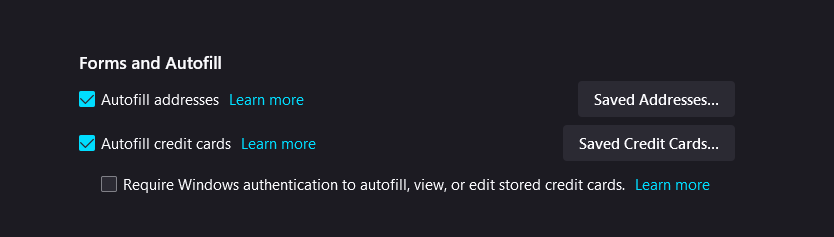
Autofill failure. Cache/history clearing does not alter Firefox network settings. Resetting firefox does not work. I go to settings and click the relevant autofill permissions which then work....untill my laptop is closed/shut down and Firefox then un ticks my autofill. I have given up and now sadly moved to using Google.