


Google Docs Incompatibility Issues

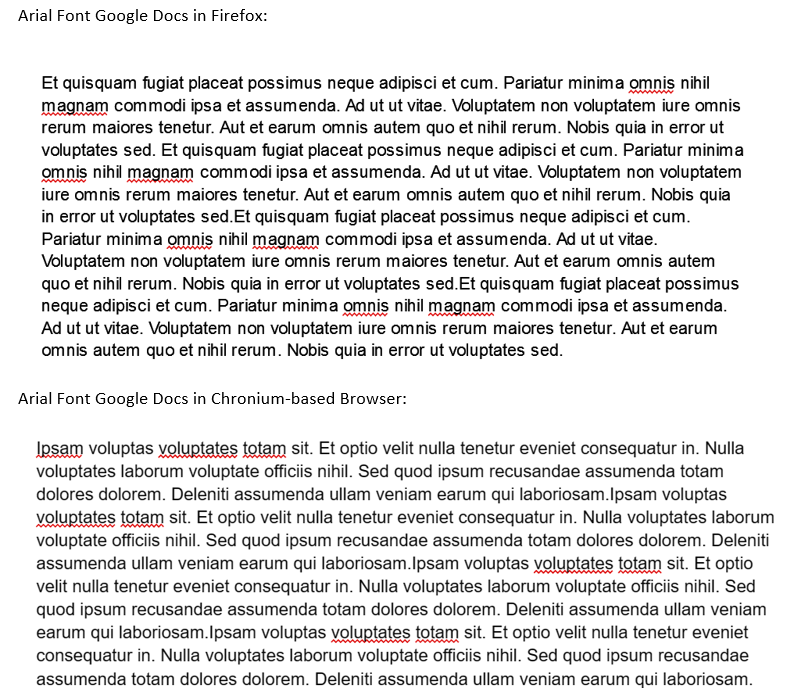
Lately everytime I access Google Docs, the text somehow looks very bad. The problem is exclusively in Google Docs website and only happens when using Arial font. The problem did not persist in the other browser. Please help to forward this issue to the development team. Thank you
Lately everytime I access Google Docs, the text somehow looks very bad. The problem is exclusively in Google Docs website and only happens when using Arial font. The problem did not persist in the other browser. Please help to forward this issue to the development team. Thank you
すべての返信 (1)

[v56+] Type about:preferences#general<enter> in the address bar. Under fonts and colors, press the Advanced button. Scroll to the bottom, turn on Allow Web Sites To Choose Their Own.
Make sure you haven't enabled a High Contrast theme in the OS settings.
- We have seen reports that this can be caused by a problem with fonts like Roboto or Helvetica that
you have installed locally and that might be corrupted or are missing some variants. Also, make sure you allow pages to choose their own fonts and that you do not block remote (downloadable) fonts.
- https://support.mozilla.org/questions/1325619 Weird font on some website's
- If you use uBlock Origin make sure not to "block remote fonts".