


Windows 10 reached EOS (end of support) on October 14, 2025. For more information, see this article.

Mozilla サポートの検索

サポート詐欺に注意してください。 私たちはあなたに通話やショートメッセージの送信、個人情報の共有を求めることはありません。疑わしい行為を見つけたら「迷惑行為を報告」からご報告ください。

詳しく学ぶ

このスレッドはアーカイブに保管されました。 必要であれば新たに質問してください。

Autofill prevents forms working - at all! Firefox Developer 91.0b5 (64-bit)

  • 1 件の返信
  • 1 人がこの問題に困っています
  • 96 回表示
  • 最後の返信者: shinyblue

Since firefox updated this morning, I'm no longer able to log in to some sites using forms once auto fill is active.

I've created a new blank profile to test, and it's the same behaviour.

1. start blank profile 2. visit https://bandcamp.com/login 3. enter a username and password (doesn't matter that it's not real) and hit Submit 4. tell Firefox to remember password. 5. clear the form and reload the login page. 6. try to allow firefox to auto fill the fields

There's a really weird mix of things that go on

- sometimes one of the fields is populated, more often they both go yellow, but blank. - double clicking in a field seems to momentarily reveal contents, but then it goes blank again. - typing in an apparently blank but yellow field seems to suddenly append characters to the auto-filled value.
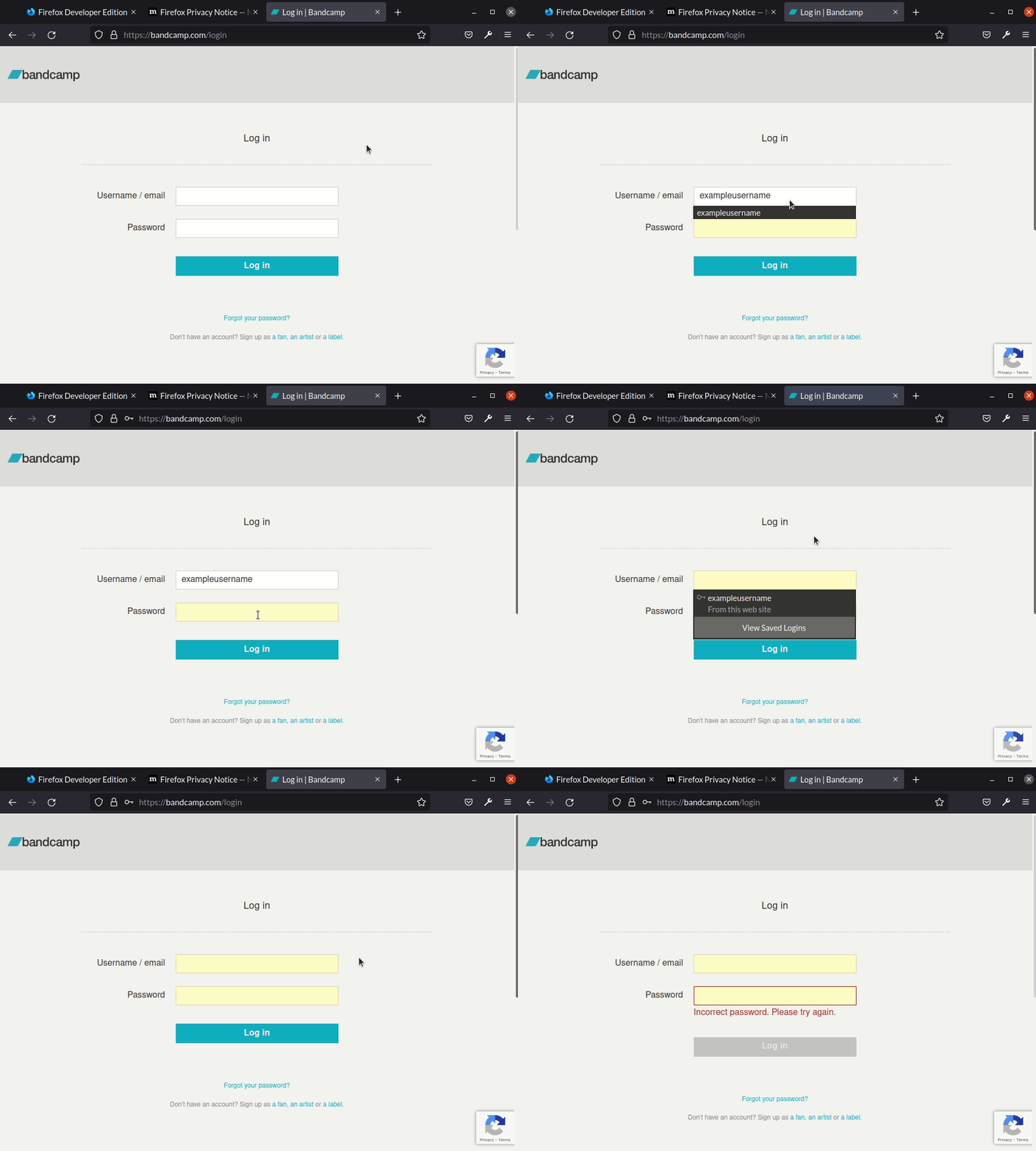
Since firefox updated this morning, I'm no longer able to log in to some sites using forms once auto fill is active. I've created a new blank profile to test, and it's the same behaviour. 1. start blank profile 2. visit https://bandcamp.com/login 3. enter a username and password (doesn't matter that it's not real) and hit Submit 4. tell Firefox to remember password. 5. clear the form and reload the login page. 6. try to allow firefox to auto fill the fields There's a really weird mix of things that go on - sometimes one of the fields is populated, more often they both go yellow, but blank. - double clicking in a field seems to momentarily reveal contents, but then it goes blank again. - typing in an apparently blank but yellow field seems to suddenly append characters to the auto-filled value.
添付されたスクリーンショット

すべての返信 (1)

(note in the screencast attached, which starts at step 6, the first autofills are not the password one - this in itself was confusing, but after a while you'll see I reload the page and get the normal autofill passwords popups)