このスレッドはアーカイブに保管されました。
必要であれば新たに質問してください。

Solved
アーカイブに保管済み
Search bar preferences
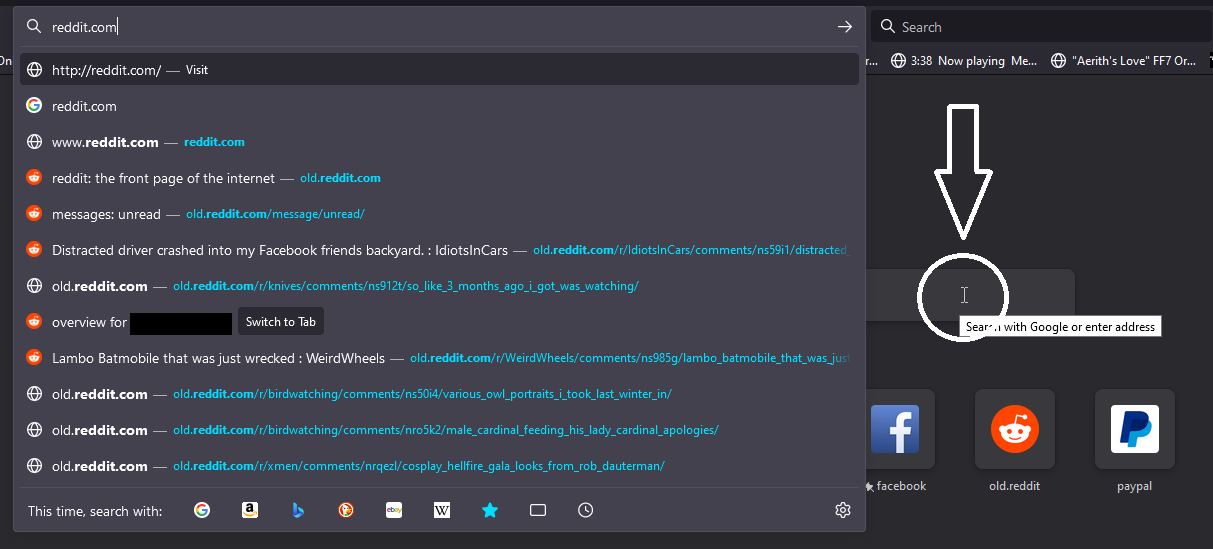
Before the most recent update, if I typed something into the search bar on the start page it would offer suggestions from the bar. Now the suggestions drop down from the address bar. Can this be reverted? The arrow in my screenshot is where the suggestions used to show up. The rest of the image is showing where they now come from post update.
Before the most recent update, if I typed something into the search bar on the start page it would offer suggestions from the bar. Now the suggestions drop down from the address bar. Can this be reverted? The arrow in my screenshot is where the suggestions used to show up. The rest of the image is showing where they now come from post update.