


svg rendering blurry
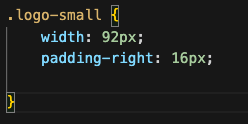
Hi, I have trouble with my svgs in Firefox. They render perfectly crisp in Safari and Chrome, but blurry in Firefox. I googled the problem and tried numerous suggestions to fix it, but none did. Can please anyone help me with that issue? I'll attach a screenshot with the snippet.
Thanks!!!!
Hi,
I have trouble with my svgs in Firefox. They render perfectly crisp in Safari and Chrome, but blurry in Firefox.
I googled the problem and tried numerous suggestions to fix it, but none did. Can please anyone help me with that issue? I'll attach a screenshot with the snippet.
Thanks!!!!

すべての返信 (5)
Can you provide a test sample of this issue on codepen.io or jsfiddle.net ? Thanks.
You may have accidentally zoomed webpage(s). Reset the page zoom on pages that cause problems.
- View -> Zoom -> Reset (Ctrl+0/Command+0 (zero))
Thanks for your reply! Here is the codeine link: https://codepen.io/Friderike/pen/OJReYPp
Frida
.. No, I didn't zoom in originally, but actually that's what I expect from an svg, to not pixelate WHEN zoomed in...
I'm not really detecting a difference on Windows 10.

