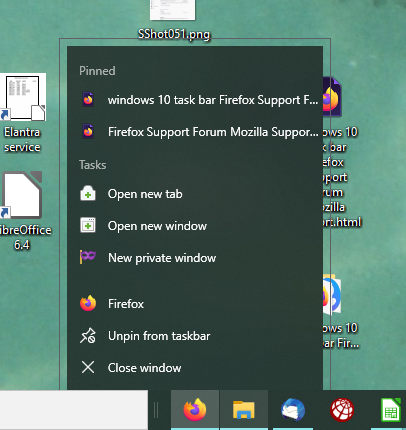
windows 10 task bar
how to pin a browser window to task bar in windows 10
すべての返信 (3)
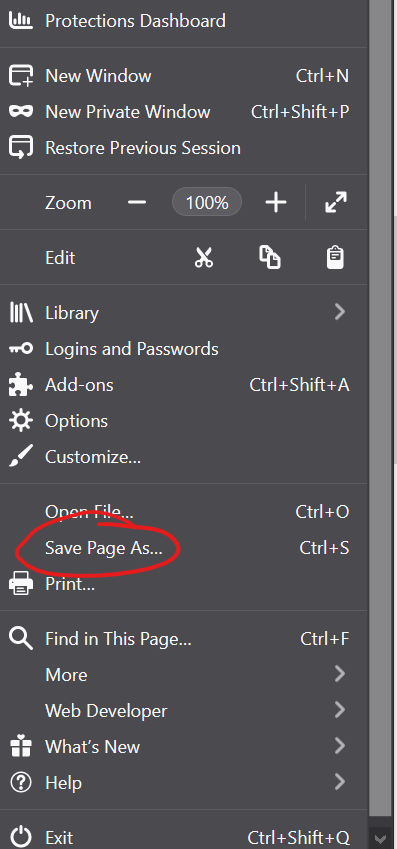
You can pin firefox to the task bar, by right-clicking the firefox icon at the task bar and choosing pin firefox to task bar. If you want to save one page, open the hamburger-menu, choose save page as and follow the instructions.
この投稿は schnrl により に変更されました
What instructions? It just wants to know file name and type. I know how to save Firefox to the task bar. What I would like to know is how to save a particular web site to the task bar while in firefox. In microsoft edge it's easy but not that the same in firefox.
You can create many Firefox shortcuts and have them all placed on the desktop,
but you can only have a single Firefox icon pinned to the taskbar.
(If you run different instances of Firefox, they each may have a taskbar shortcut)
Unlike bookmarks, The firefox shortcut must point to a file stored on your computer. So when you create the shortcut, you still need to keep the original file and its related folder in some location on your computer, taking up disk space..
Normally when you add a second Firefox shortcut to the taskbar, it will be combined with the first shortcut and will appear at the top of the panel when you right-click on that shortcut.
In the screenshot attached, when I click on Firefox, I get my Homepage
If I click on either of the other links at the top, that individual page will load.
It is not as efficient as bookmarks.
You have to "Save page as" to some location, two files are created, one is the file itself and the other is a linked folder with images, css, etc. Just drag the file (not the linked folder) to the taskbar where it will be added to the existing shortcut as a separate entry. If you subsequently move the file, or its related folder, the shortcut will be broken.
I hope this helps.