


VTT subtitles are shown double in latest Firefox
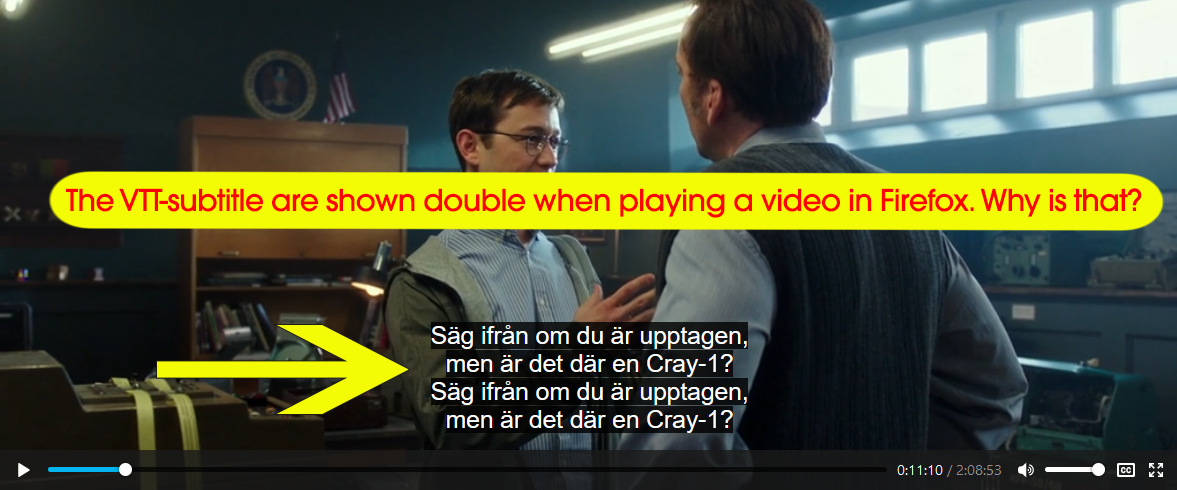
When I play a video in the latest Firefox (Windows or Mac) from the streaming service www.cineasterna.com the VTT-subtitle are shown double.
This issue did not occur in previous version of Firefox. The subtitles works fine and does not show double in other browsers (Chrome, Safari, Edge, IE).
Why is that?
すべての返信 (2)
You can try these steps in case of issues with web pages:
You can reload web page(s) and bypass the cache to refresh possibly outdated or corrupted files.
- hold down the Shift key and left-click the Reload button
- press "Ctrl + F5" or press "Ctrl + Shift + R" (Windows,Linux)
- press "Command + Shift + R" (Mac)
Clear the Cache and remove the Cookies for websites that cause problems via the "3-bar" Firefox menu button (Options/Preferences).
"Remove the Cookies" for websites that cause problems:
- Options/Preferences -> Privacy & Security
Cookies and Site Data -> Manage Data
"Clear the Cache":
- Options/Preferences -> Privacy & Security
Cookies and Site Data -> Clear Data -> Cached Web Content: Clear
Start Firefox in Safe Mode to check if one of the extensions ("3-bar" menu button or Tools -> Add-ons -> Extensions) or if hardware acceleration is causing the problem.
- switch to the DEFAULT theme: "3-bar" menu button or Tools -> Add-ons -> Themes
- do NOT click the "Refresh Firefox" button on the Safe Mode start window
Thanks, but that did not solve my problem.