


Firefox 67.0 (64 bit) can no longer create a desktop shortcut to a website

Until I updated the browser this morning I would normally:
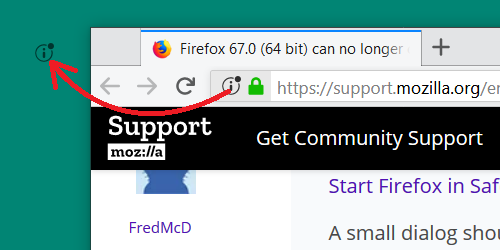
    Click the icon on the left of the address bar (where the URL is shown).
    While still holding the mouse button down, move the pointer to the desktop, then release the mouse button. The       shortcut will be created.
This no longer works. Any suggestions. Using Windows 7.
選ばれた解決策
Thanks to each of you for your suggestions. I had disabled add-ons, tried key combos and still had the issue. Interestingly two reboots and a day later everything works as it should. Go figure!
すべての返信 (6)

Start Firefox in Safe Mode {web link}
A small dialog should appear. Click Start In Safe Mode (not Refresh). Is the problem still there?
Does it make a difference if you hold Ctrl or Shift ?
See also:
I'm sure it's no consolation, but when I drag the "i-in-a-circle" icon on Windows 10, it is still working the same as previous versions (the mouse pointer doesn't show in the screenshot, unfortunately):

選ばれた解決策
Thanks to each of you for your suggestions. I had disabled add-ons, tried key combos and still had the issue. Interestingly two reboots and a day later everything works as it should. Go figure!
As long as the problem is gone. Please flag your last post as Solved Problem so others will know.
Problem solved, Thank you.