


Profiles- How to create a local directory profile for caching

When creating a new profile, a root directory profile is created, but not a local directory profile. My understanding is that the profile associated with the local directory is used for caching. My goal is to move my root directory profile to another partition that gets backed up daily. The local directory profile that is used for caching can move with my new root directory profile or stay where it is- I don't care either way. It looks like if I were to delete my old profile, both root and local directory profiles would be deleted, and I would no longer have a local directory profile for caching associated with my new root directory profile. Bottom line is perhaps how to create a new local directory profile for caching to work with my new default root directory profile. See attached screenshot. Thanks in advance for your help.
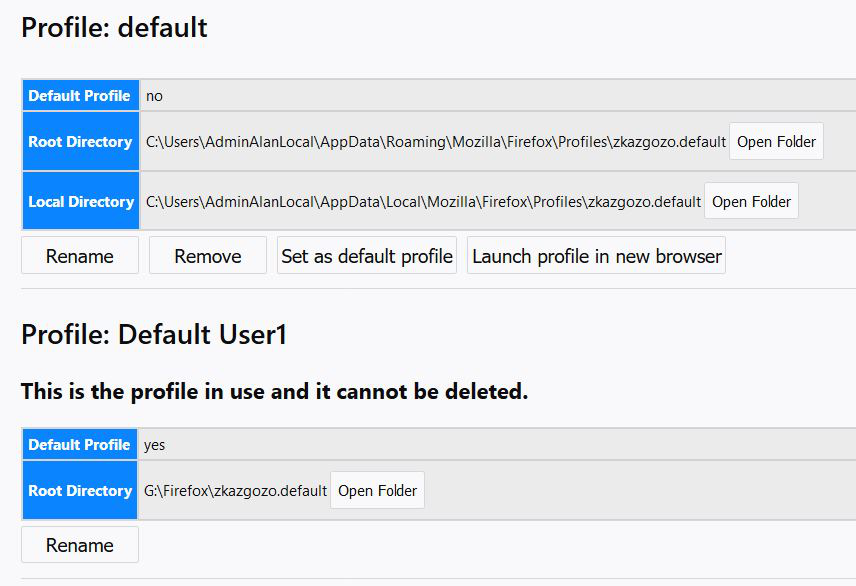
選ばれた解決策
jscher2000 said
Hi Alanwf, it's possible that there actually is a "local" folder but the logic of the about:profiles page is incapable of showing the information. Could you open the about:cache page (while running in that "G" drive profile) and check the Storage disk location under the disk heading?
jscher2000, The storage disk location says "G:\Firefox\zkazgozo.default\cache2 " Does that mean that the one new root directory profile folder on my G: drive now does the caching too? The local directory profile folder is not needed? I believe that is what cor-el response suggests:
cor-el said
If you use the Profile Manager to create a profile in the not default location then the cache folder should be in the main profile as well (i.e. all files and folder in one profile folder).
Regardless, after making my post, I discovered that I can use a symbolic link using windows CMD line command MKlink. That way I can leaving the caching where it is and move my root directory profile to the G partition, which is what I prefer.
この回答をすべて読む 👍 0すべての返信 (4)

The cache for zkazgozo.default is in that folder.
Hi Alanwf, it's possible that there actually is a "local" folder but the logic of the about:profiles page is incapable of showing the information.
Could you open the about:cache page (while running in that "G" drive profile) and check the Storage disk location under the disk heading?
If you use the Profile Manager to create a profile in the not default location then the cache folder should be in the main profile as well (i.e. all files and folder in one profile folder).
選ばれた解決策
jscher2000 said
Hi Alanwf, it's possible that there actually is a "local" folder but the logic of the about:profiles page is incapable of showing the information. Could you open the about:cache page (while running in that "G" drive profile) and check the Storage disk location under the disk heading?
jscher2000, The storage disk location says "G:\Firefox\zkazgozo.default\cache2 " Does that mean that the one new root directory profile folder on my G: drive now does the caching too? The local directory profile folder is not needed? I believe that is what cor-el response suggests:
cor-el said
If you use the Profile Manager to create a profile in the not default location then the cache folder should be in the main profile as well (i.e. all files and folder in one profile folder).
Regardless, after making my post, I discovered that I can use a symbolic link using windows CMD line command MKlink. That way I can leaving the caching where it is and move my root directory profile to the G partition, which is what I prefer.
この投稿は Alanwf により に変更されました