


Firefox memory leak

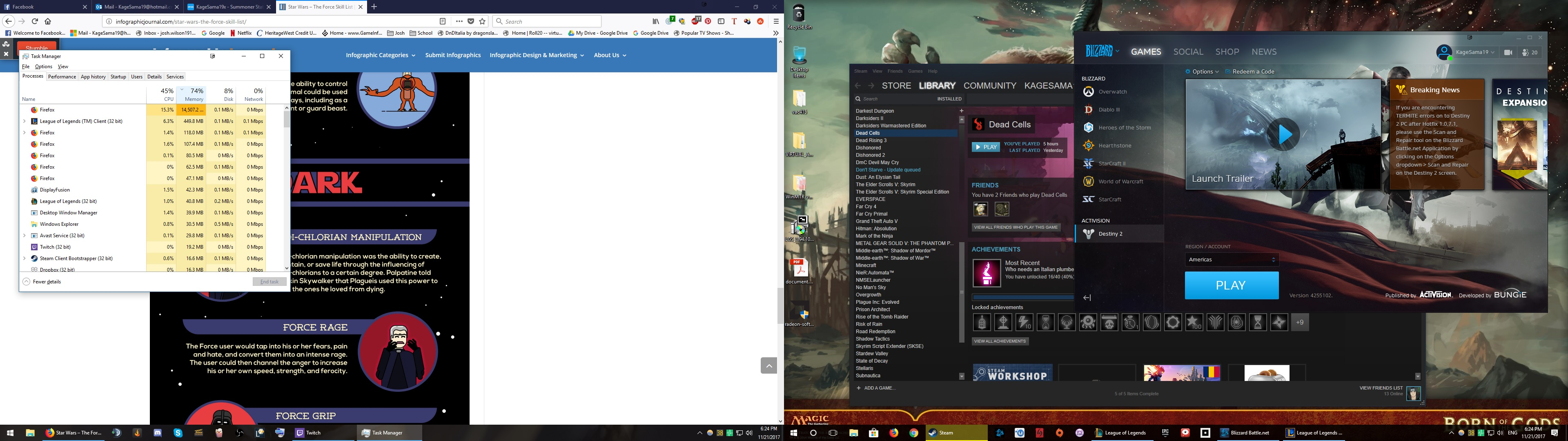
So now and then I will have this issue where my entire computer lags and seizes up, oddly seems to happen most often when I play League of Legends, and when it happens I open task manager and sort my processes by memory usage as it shows 99% usage. When I do this I see several instances of firefox despite only having one window open with 3-4 tabs, and the instance of firefox at the top shows a few GB of memory usage. This is grossly over what the program should be using, so it indicates to me a memory leak.
すべての返信 (2)
As you can see here, at the time of the screenshot firefox was consuming over 14 GB of memory. Right after I took the shot it peaked at 16 GB. This is horrific, you guys need to fix this ASAP

Mines locking up constantly too. I've had to reboot about 5 times today. It's ridiculous. And I don't play games other than solitaire... I'm a 60 yr old woman. The tabs are hard on the eyes and you can barely tell which tab is up. This is the worst update you guys have ever done.